PCS: Starting a process instance remotely by Rubén Rodríguez Santiago


clip_image001

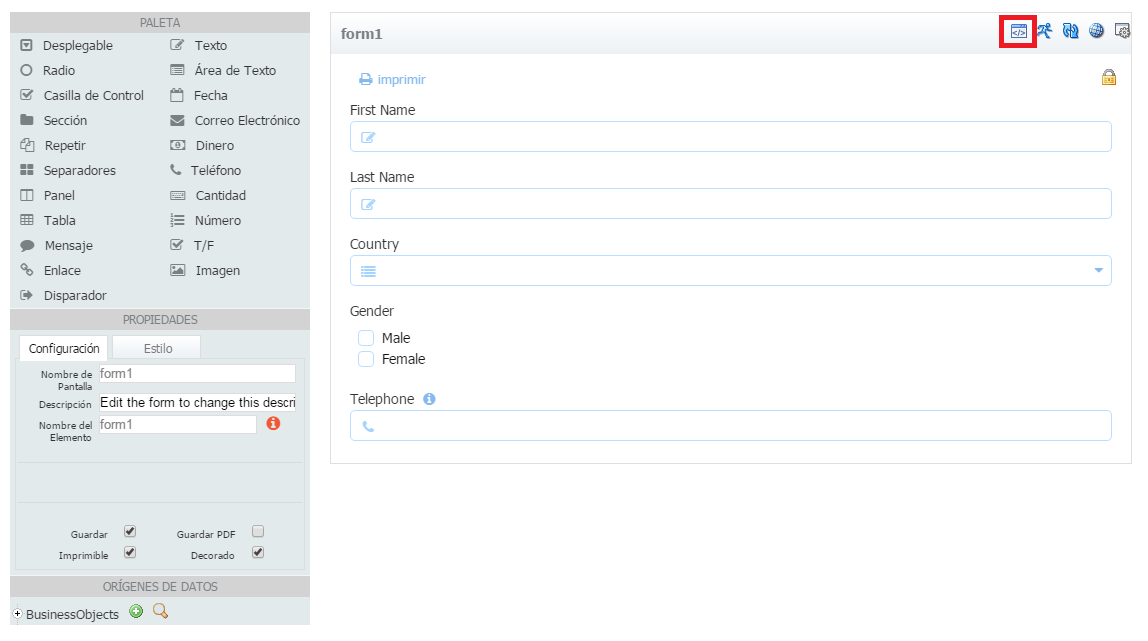
While implementing an Oracle Process Cloud Service PoC we had the requirement to allow users to start an instance using a form in their custom mobile application and also using the workspace.

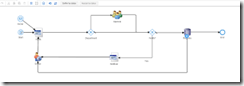
We have a ‘Form Start Event’ so users can start the instance thought the workspace. We also added a ‘Message Start Event’ in order to publish it as a web service.

Having that process deployed, if we head to ‘Deployed Applications’ in workspace main page.

And click on the button in ‘Actions’ column.

We can see the web services exposed.

If we use that wsdl url in soapui we see that we have 2 operations, one for each of the start events.

Executing both, we can see that even using ‘Form Start Event’ we can start a process instance remotely as an operation is automatically created in the web service, so we can remove the ‘Message Start Event’ as we can meet both requirements just using the ‘Form Start Event’. Read the complete article here.

SOA & BPM Partner Community

For regular information on Oracle SOA Suite become a member in the SOA & BPM Partner Community for registration please visit www.oracle.com/goto/emea/soa (OPN account required) If you need support with your account please contact the Oracle Partner Business Center.

Blog Twitter LinkedIn image[7][2][2][2] Facebook clip_image002[8][4][2][2][2] Wiki

Video – How to build a Process Cloud Service Application (Business Travel Requests) in 40 minutes – Final Part – Wrapping it Up! by Jose Rodrigues

clip_image002


Welcome to Red Maverick’s sixth video, the third of the Business Travel Request Management Series. In this series we’ll guide you on how to build a complete, working BPM application using  Oracle’s Process Cloud Service. For this part, the focus is on doing the final configurations and connecting all the dots, making the application fully functional. This scenario and video was first prepared by me for Link Consulting‘s Process Cloud event, that was held in July 2015. Watch the video here.

SOA & BPM Partner Community

For regular information on Oracle SOA Suite become a member in the SOA & BPM Partner Community for registration please visit www.oracle.com/goto/emea/soa (OPN account required) If you need support with your account please contact the Oracle Partner Business Center.

Blog Twitter LinkedIn image[7][2][2][2] Facebook clip_image002[8][4][2][2][2] Wiki

PaaS free trial accounts ICS and PCS, IoT and PaaS for SaaS

image

As part of our communities we do offer free PaaS accounts (only for partners in Europe, Middle East and Africa. In case you are not part of EMEA please contact your local partner manager):

· Integration Cloud Service & Process Cloud Service & SOA Cloud & IoT & PaaS for SaaS Service PaaS Demo Accounts  (Community membership required)

· Java Cloud Service & Application Cloud Container Service & Mobile Cloud Service PaaS Demo Accounts (Community membership required)

Watch the GSE Overview Video! Get an overview of what GSE is and how you can use GSE to help you sell. You can also get long running dedicated PaaS instances, therefore please send us details about your use cases. For instant access please request a sandbox demo

SOA & BPM Partner Community

For regular information on Oracle SOA Suite become a member in the SOA & BPM Partner Community for registration please visit www.oracle.com/goto/emea/soa (OPN account required) If you need support with your account please contact the Oracle Partner Business Center.

Blog Twitter LinkedIn image[7][2][2][2] Facebook clip_image002[8][4][2][2][2] Wiki

Technorati Tags: PaaS,Cloud,ICS,PCS,PaaS4SaaS,SOA Community,Oracle SOA,Oracle BPM,OPN,Jürgen Kress
Thomas Kurian PaaS Oracle OpenWorld 2016 keynote summery

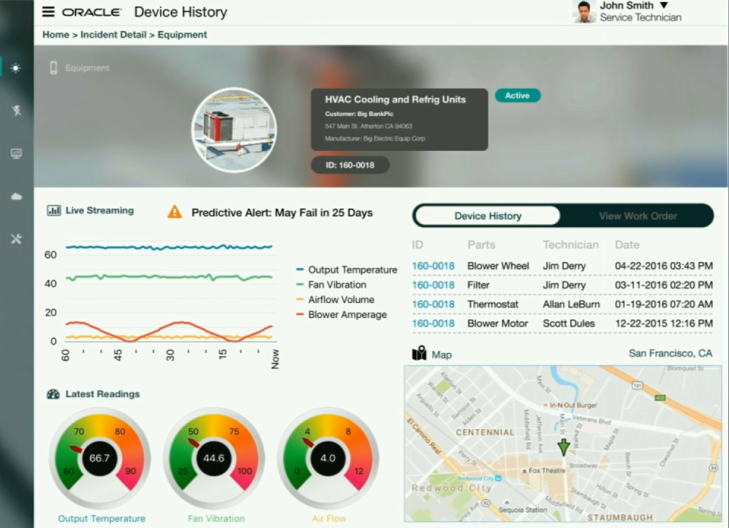
During Oracle OpenWorld 2016 keynote Thomas Kurian showcased the Oracle IaaS, PaaS and SaaS portfolio in many live demos. Some of the highlights include key PaaS solutions:

Paas1Paas2paas3paas4paas5paas6paas7paas9

Slides and demos will become available for partners via the communities in the next weeks. Please see partner community details. below.

Want to try the Oracle PaaS Service?

Want to know how you can position your services around Oracle PaaS?

Watch the on-demand PaaS Partner Webcast www.tinyurl.com/salesPaaS

Make us of the sales Oracle kits and learn how to position your services:

clip_image002

Want to learn more about Oracle PaaS Services?

Join the Partner Communities free of charge:

SOA & BPM Partner Community

For regular information about Oracle’s PaaS and Middleware solutions become a member in the SOA & BPM Partner Community for registration please visit www.oracle.com/goto/emea/soa (OPN account required) If you need support with your account please contact the Oracle Partner Business Center.

WebLogic Partner Community

For regular information about Oracle’s PaaS and Middleware solutions  become a member in the WebLogic Partner Community please visit: http://www.oracle.com/partners/goto/wls-emea ( OPN account required). If you need support with your account please contact the Oracle Partner Business Center.


Enjoy Oracle OpenWorld 2016!

Jürgen Kress

SOA & BPM Partner Community

For regular information on Oracle SOA Suite become a member in the SOA & BPM Partner Community for registration please visit www.oracle.com/goto/emea/soa (OPN account required) If you need support with your account please contact the Oracle Partner Business Center.

Blog Twitter LinkedIn image[7][2][2][2] Facebook clip_image002[8][4][2][2][2] Wiki

ICS Update – On premise Agent now Available by Arturo Viveros

clip_image001


Hello appreciated readers, here’s hoping to a fun and successful 2016 for you all!!

And for us Oracle FMW practitioners, there are some very exciting news to begin the year:
Yours truly has been following for a while the development and growth of Oracle’s iPaaS platform: "Integration Cloud Service". And it’s been a long wait, but at long last the ultra hyped On-Premise Agent has been released and is now available for all ICS subscriptions.
There are some other cool and useful new features in this release (e.g. content based routing, new adapters, etc.), which we will surely discuss during the next few weeks in a different post. However, in our humble opinion the Agent is a transcendent piece of the puzzle, which will open up a whole new set of use cases and possibilities for the implementation of cloud-driven integrations with ICS. So, what does this mean?, let’s look at it graphically:

Oracle ICS was an already powerful yet simple to implement tool, suited perfectly for Cloud to Cloud Integrations but somehow limited in its potential to participate in hybrid solutions (those which also include on-prem interaction). The obvious problem here is that we know Hybrid Architectures are still predominant among organizations in the midst of a cloud adoption strategy. And that’s why the Agent is a real game-changer: Read the complete article here.

SOA & BPM Partner Community

For regular information on Oracle SOA Suite become a member in the SOA & BPM Partner Community for registration please visit www.oracle.com/goto/emea/soa (OPN account required) If you need support with your account please contact the Oracle Partner Business Center.

Blog Twitter LinkedIn image[7][2][2][2] Facebook clip_image002[8][4][2][2][2] Wiki

New Agent Simplifies Cloud to On-premises Integration by Bruce Tierney


clip_image002Oracle Integration Cloud Service has generated a lot of enthusiasm since the June 2015 Oracle PaaS launch by Larry Ellison.  A major reason for this enthusiasm was the introduction of simplicity to cloud integration…historically a complex process only possible by integration specialists.  We are very pleased to introduce to Integration Cloud Service this same level of simplicity to the integration of on-premises applications allowing for faster and easier integration of existing on-premises applications with cloud SaaS applications.  

As shown in the image to the right, the new Agent feature within Oracle Integration Cloud Service eliminates common security and complexity issues previously associated with integrating on-premises applications from outside the firewall.   For example, there is no need to open an inbound port to communicate with on-premise systems and no need to expose any private SOA-based Web services.  Access the new Agent from the menu shown in the image below and let the agent simply and securely handle the communication. 

Furthermore, new adapters have been added to Integration Cloud Service to simplify the integration to on-premises applications.  These adapters are for Oracle E-Business Suite, Oracle Siebel Customer Relationship Management, SAP, Oracle Database, and the SOAP technology adapter.  The SOAP adapter can be used to connect to any Web service enabled application, including services exposed on Oracle SOA Suite or other on-premises integration platforms.clip_image006

Prior to creating the Agent or Agents, create your "Connections" to your applications.   Simply select and configure from a wide range of Oracle Applications such as Oracle CPQ Cloud, Sales Cloud, Service Cloud, HCM Cloud to name a few, 3rd party applications such as Salesforce.com, NetSuite and now with this release to on-premises applications.  See the image below to see some of the adapter choices: Read the complete article here.

SOA & BPM Partner Community

For regular information on Oracle SOA Suite become a member in the SOA & BPM Partner Community for registration please visit www.oracle.com/goto/emea/soa (OPN account required) If you need support with your account please contact the Oracle Partner Business Center.

Blog Twitter LinkedIn image[7][2][2][2] Facebook clip_image002[8][4][2][2][2] Wiki

Mobile & IoT Showcase @ OpenWorld Moscone South, #109

clip_image001

If you’ve been following Oracle’s mobile (r)evolution, we’ve been trending some impressive growth and mobile chops worth bragging about. The recent updates to Oracle Mobile Cloud Service, with the addition of Oracle MAX codeless development, new Location Based Services, bringing highly granular contextual apps (Manchester Airports Groupcomes to mind) and helping extend existing Forms based apps to Mobile First apps (New York MTA), we’re truly helping to mobilize our customers. Come see all of this, plus new mobile innovations and much more. Visit the Mobile & IoT Showcase at Moscone South, 109. Here’s a bit of a preview:

· Mobile Platform – catch the latest demo showcasing Oracle MCS latest features, Oracle MAX and Location Based Services

· Oracle JET, Oracle’s JavaScript Extension Toolkit. It’s open source. Yeah, that’s right, open source.

· Customer Insight and Engagement capabilities with multi-channel analytics, analysis, churn prediction & engagement

· Mobile innovations around chatbots, mobile beacons, and perhaps some interesting proof of concept apps created by Oracle’s A-Team

· Kick back at the Mobile & IoT Theatre to watch some in-depth presentations by technical experts in their field

For a great overview on what’s new and the Oracle Mobile roadmap catch this key OpenWorld session:

Mobile Now and in the Future: Location, Cognitive Insights, Chatbots, and Much More [CON7881]

clip_image001

SOA & BPM Partner Community

For regular information on Oracle SOA Suite become a member in the SOA & BPM Partner Community for registration please visit www.oracle.com/goto/emea/soa (OPN account required) If you need support with your account please contact the Oracle Partner Business Center.

Blog Twitter LinkedIn image[7][2][2][2] Facebook clip_image002[8][4][2][2][2] Wiki

Using Oracle Integration Cloud Service tutorial

clip_image001


When you subscribe to Oracle Integration Cloud Service, you also have the option to install an on-premises version of Oracle Integration Cloud Service in your local environment. This enables you to use on-premises Oracle Integration Cloud Service as a proxy server that sits between your internal company server hidden behind a fire wall and the cloud version of Oracle Integration Cloud Service. After installation, you can create users and assign roles to these users on the Users page of on-premises Oracle Integration Cloud Service. Read the tutorial here. & REST API for Oracle SOA Cloud Service tutorial here.

SOA & BPM Partner Community

For regular information on Oracle SOA Suite become a member in the SOA & BPM Partner Community for registration please visit www.oracle.com/goto/emea/soa (OPN account required) If you need support with your account please contact the Oracle Partner Business Center.

Blog Twitter LinkedIn image[7][2][2][2] Facebook clip_image002[8][4][2][2][2] Wiki

Agent for simplifying Integration between Cloud and On-Premises apps by Robert van Molken


clip_image001In the last few months I mentioned that Oracle is developing an Agent. The Agent easily integrates your on-premises application(s) with the Oracle Cloud Services. The Agent is rolling out on all production instances next week. It was publicly announced by Bruce Tierney on the 3rd of January. He is the Director of Product Marketing for Cloud Integration and SOA. You can read his announcement on the Oracle Integration blog.

In this first article about the Agent I will go into the architectural basics,  which components are included and how it will connect Cloud to On-premises applications. The article is based on information I presented about during OpenWorld 2015.

Current / classic integration approach

The current approach for connecting Cloud / Internet hosted applications with On-premises applications is usually through one or more firewalls, and the use of a reverse proxy, Oracle API Gateway or OHS. For this a variety of expertise is needed for example to open up inbound ports in the firewall, expose a private SOAP/REST service and configure the network routing. The SOAP/REST service can for example be implemented with SOA Suite to for example communicate with the CRM to retrieve customer data.

Let look at the current / classic approach in the diagram below:

This is going to change a lot when using the Agent. It will simplify above diagram.

Common Cloud to On-Premises Integration Patterns

Currently there are three common patterns for Cloud to On-Premises integrations. They are 1. using messaging, 2. through a proxy and 3. using an agent. Read the complete article here.

SOA & BPM Partner Community

For regular information on Oracle SOA Suite become a member in the SOA & BPM Partner Community for registration please visit www.oracle.com/goto/emea/soa (OPN account required) If you need support with your account please contact the Oracle Partner Business Center.

Blog Twitter LinkedIn image[7][2][2][2] Facebook clip_image002[8][4][2][2][2] Wiki

Content-Based Routing with Integration Cloud Service by Robert van Molken

clip_image002

In my previous article I discussed the fall updates of Integration Cloud Service. One of the features in this update is the possibility for content-based routing within integrations. I came across this feature during UKOUG Tech 15 in the beginning of December. In an two our hands-on lab I had some time to play with the content-based routing feature. The amazing thing is that it did it all on my iPad. In this article I will describe the feature and the steps to implement a common use-case.

What does Content-Based Routing mean?

The fall updates introduced content-based routing, which essentially mean that based on a value in the payload a different flow is executed. A use-case for this type of routing is the possibility to retrieve data from a different application based on the country code. With Integration Cloud Service is as easy as adding a filter on the request operation of the source connection.

Step 1: Adding a filter to route on

The first step is adding a filter to route the request on. To demonstrate this I’m using an already existing integration. This integration receives a GET request for retrieving the information of an organization. The current integration always retrieves the organization from the US site.

To add a filter a user would click on the funnel icon. Clicking on this icon will open the Expression Builder. In the Expression Builder a user can set an expression to filter requests on. This can simply be done by drag n drop the field to filter on. Read the complete article here.

SOA & BPM Partner Community

For regular information on Oracle SOA Suite become a member in the SOA & BPM Partner Community for registration please visit www.oracle.com/goto/emea/soa (OPN account required) If you need support with your account please contact the Oracle Partner Business Center.

Blog Twitter LinkedIn image[7][2][2][2] Facebook clip_image002[8][4][2][2][2] Wiki