Setting up SSH tunnels for cloud to on-premise with SOA Cloud Service clusters by Christian


clip_image002Executive Overview

With the current release of SOA Cloud Service (SOACS) a common requirement often requested is to connect to an on-premise  database from the cloud SOACS instance. SSH tunnels can be used to establish cloud to on-premise communications, allowing SOA Cloud Service to access resources from on-premise applications.

Companion post : Single host SSH tunneling

My colleague, Shub Lahiri has written an excellent article as well, he discusses the simpler configuration where there isn’t a cluster of managed servers in the cloud- this is much simpler to setup,more suited for a development environment but cannot work with a cluster set up in the cloud.

Overview

This post expands on the concept of ssh tunneling using a more advanced setup to allow connection of a SOA Cloud cluster to a on-premise database. In principle this setup could be configured to access any tcp based service on-premise.

Motivation

Every managed server requires access to the on-premise database or other resource, for composite flows using the resource to function, as work is almost universally load-balanced between managed server nodes. Unfortunately, that means either we have multiple on-premise ssh connections to the cloud, or we have this solution. Multiple connections requires every managed server have a unique public IPV4 address. Unfortunately, IPV4 addresses are a scarce resource and as such, SOACS does not provision one for every managed server node.

Network topology

For this example, we will be tunneling database traffic, allowing a Database Adapter deployed in the cloud to access an on-premise Oracle Database. The SOA Suite cluster will be running on 2 compute nodes (a 2 node SOA cluster) with the standard SOA CS setup – an LBR node as the front end gateway, and a Database Cloud Service node for SOA Suite persistence.

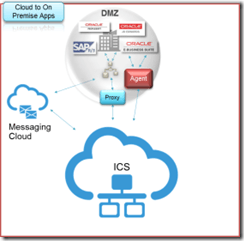
The diagram shows the basic idea of the network topology. SSH is used from the database server on-premise to connect the database node of the SOA cluster in the cloud. The specific choice of the databases is technically incidental – this approach will work with the bridge between any two hosts on-premise and cloud, but it seems the most natural fit for a tunneled database connection to use the databases.

The DB host on-premise runs a reverse SSH tunnel to the DB host in the cloud. Traffic for the on-premise database flows (green lines) from the managed servers, via the SSH tunnel to the DB on-premise. The apparent connectivity is to the DB host in the cloud, but in reality SSH is back-hauling the traffic through the tunnel to on-premise.

Setting up

Unlike the single managed server usecase, we need to tweak some components of the cloud setup to allow the shared SSH tunnel to work.

First, we need to clarify some terminology:
The SSH server host – the endpoint in the cloud to which ssh connectivity is established. In the diagram above, it is the “DB” node in the cloud.
The SSH client – the endpoint on-premise from which ssh connectivity is established. In the diagram above it is the “OnPremise DB” node.
The managed servers – the hosts in the cloud which require access to the SSH tunnel to communicate to on-premise. In the diagram above, they are identified as MS1 and MS2. Read the complete article here.

SOA & BPM Partner Community

For regular information on Oracle SOA Suite become a member in the SOA & BPM Partner Community for registration please visit www.oracle.com/goto/emea/soa (OPN account required) If you need support with your account please contact the Oracle Partner Business Center.

Blog Twitter LinkedIn image[7][2][2][2] Facebook clip_image002[8][4][2][2][2] Wiki

Starting out with Oracle SOA CS – my first steps on a fairly advanced PaaS service by Lucas Jellema on January


clip_image002One of the platform offerings in the Oracle Public Cloud is the SOA Cloud Service. This service offers various flavors of SOA Suite 12c (Service Bus, SOA Suite, Technology Adapters) and API Manager 12c, automatically provisioned on the cloud. This service builds on top of a pre-existing DBaaS instance and Storage CS container and implicitly creates a JCS instance and several compute nodes on IaaS Compute CS – as shown in the figure to the right.

This article describes my first steps in getting started with SOA CS. In less than two hours, I had my first simple Service Bus project running on the SOA CS instance. From SoapUI on my local laptop, I could run a load test against the service exposed by the Service Bus, accessed via the automatically provisioned Load Balancer. The average response time was 60 ms, consisting to a large extent of the network latency from my laptop to Oracle’s data center.

Preparation

Before you can request provisioning of a SOA CS instance, you need to have gone through some preparations (also see documentation):

  • you need a (trial) subscription to SOA CS
  • you need a running DBaaS instance – a database instance that will host the SOA Infra schema, the MDS schema and other SOA Suite components (see this article about preparing such as DBaaS instance)
  • you need a (trial) subscription to Storage Cloud Service and you need to prepare a storage container on this service – to host the back ups of the SOA CS instance
  • you need to have prepared an SSH public/private key pair (which you also need to do for the DBaaS instance) and have access to the public key

Additionally, you need to decide what kind of environment you want to have provisioned: just SOA [SCA engine} or just Service Bus – or both? A single node environment or a multi-node cluster? Do you also [or only]need API Manager? The provision wizard will ask you for the answers to these questions.

The starting situation before running the provision wizard is shown here:

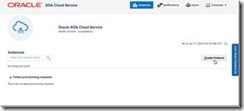
I have navigated to the Service Console for the SOA CS service in my identity domain. It would list all my instances – if I had any. Since I do not, all I can do is press the Create button to start a request to have an instance provisioned for me: The first step is the selection of the Domain Type. The options are self explanatory. Read the complete article here.

SOA & BPM Partner Community

For regular information on Oracle SOA Suite become a member in the SOA & BPM Partner Community for registration please visit www.oracle.com/goto/emea/soa (OPN account required) If you need support with your account please contact the Oracle Partner Business Center.

Blog Twitter LinkedIn image[7][2][2][2] Facebook clip_image002[8][4][2][2][2] Wiki

Using Oracle Process Mobile Application by Waslley Souza

clip_image001


When you are using the Oracle Process Cloud Service, you can use the Oracle Process Mobile Application on your mobile device to start a new process or access the task list to approve or reject the tasks assigned to you.

In this post, we will start a new process through the Oracle Process Mobile Application, approve the task assigned to a user and see the history of the process in Oracle Process Cloud Service from a web browser on a desktop computer.

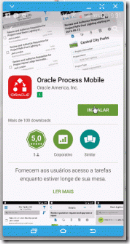
First of all, download and install the application on your mobile device.

Configure the application.
In the Host field, I used the URL for my Oracle Process Cloud Service Workspace. Read the complete article here.

To request a free OCS trial service please visit our SOA Partner Community Workspace here (SOA Community membership required)

SOA & BPM Partner Community

For regular information on Oracle SOA Suite become a member in the SOA & BPM Partner Community for registration please visit www.oracle.com/goto/emea/soa (OPN account required) If you need support with your account please contact the Oracle Partner Business Center.

Blog Twitter LinkedIn image[7][2][2][2] Facebook clip_image002[8][4][2][2][2] Wiki

Video – How to build a Process Cloud Service Application (Business Travel Requests) in 40 minutes – Part III – Business Rules Setup by Jose Rodrigues

clip_image002

Welcome to Red Maverick’s fifth video, the third of the Business Travel Request Management Series.

In this series we’ll guide you on how to build a complete, working BPM application using  Oracle’s Process Cloud Service.

For this part, the focus is on setting Business Rules using Oracle’s PCS, to fine tune the process flow path, depending on process data.

This scenario and video was first prepared by me for Link Consulting‘s Process Cloud event, that was held in July 2015. Watch the video here.

SOA & BPM Partner Community

For regular information on Oracle SOA Suite become a member in the SOA & BPM Partner Community for registration please visit www.oracle.com/goto/emea/soa (OPN account required) If you need support with your account please contact the Oracle Partner Business Center.

Blog Twitter LinkedIn image[7][2][2][2] Facebook clip_image002[8][4][2][2][2] Wiki

Basic integration of Process Cloud Service with Document Cloud Service by Lykle Thijssen

clip_image001


Recently, Oracle had released a new version of Process Cloud Service. It mainly contains some minor improvements, but also has one major update: Oracle Process Cloud Service can now use Oracle Document Cloud Service for working with documents in business processes. This blog will show you how to make it happen.

Establishing the connection

In the main page of Oracle Process Cloud Service, click on your user in the right-top corner and select “Administration”. On the Administration page, you click “Settings” under Configuration, which will get you where you want to be. Here you can fill in the URL of your Document Cloud Service, as well as username and password of the admin user. You can test the configuration immediately and click “Save” in the upper right corner when the integration was successful.

Once the connection has been established, we can proceed to using documents in our processes immediately!

Developing the process

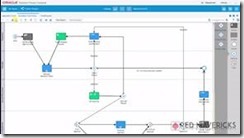
For this blog, I have created a small sample process for insurance claims. An employee of an insurance company will enter some details through a web form and attach a bill sent by a client. Then, if the bill is over $1000, a manager needs to approve or reject the claim. After this, the process will end. The small sample process looks as follows:

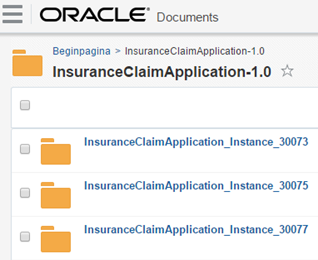
During development of the process, I have done nothing related to documents, this comes automatically! Of course, it is possible to work on document settings: for example, you can set access rights while implementing the human task. You can also create document folders on the application level of Process Cloud, but for now, I have decided to go with the default setting of one folder for my application, which will automatically be created in Document Cloud. For every instance of the process, a subfolder is automatically created too, so from Document Cloud side, it looks as follows: Read the complete article here.

SOA & BPM Partner Community

For regular information on Oracle SOA Suite become a member in the SOA & BPM Partner Community for registration please visit www.oracle.com/goto/emea/soa (OPN account required) If you need support with your account please contact the Oracle Partner Business Center.

Blog Twitter LinkedIn image[7][2][2][2] Facebook clip_image002[8][4][2][2][2] Wiki

Getting started with Process Cloud Service by Waslley Souza

clip_image002


If you know and use Oracle BPM Suite, you will like to try the new cloud solution called Oracle Process Cloud Service or PCS. With PCS you can modeling your processes through the cloud without the need to install Oracle BPM Suite. Go to PCS section within the Oracle Cloud website to learn more about or try it: http://cloud.oracle.com/process.

In this post we will create a basic process to create and approve employees.
Download the sample application: CreateEmployeeApplication.zip.

Log in to Oracle Process Cloud Service.
Click Create button, and then select New Application.

Name the application as Create Employee Application.
Select New Space option, and then name it as HR.

In this step, we will create the process and we have many options to create it.
Select the Form Approval Pattern option.

Name the process as Create Employee Process.

In the Create Employee Process, right-click Submit Request, and then select Implement. Read the complete article here.

SOA & BPM Partner Community

For regular information on Oracle SOA Suite become a member in the SOA & BPM Partner Community for registration please visit www.oracle.com/goto/emea/soa (OPN account required) If you need support with your account please contact the Oracle Partner Business Center.

Blog Twitter LinkedIn image[7][2][2][2] Facebook clip_image002[8][4][2][2][2] Wiki

Introduction to Oracle Internet of Things Cloud Service – Webcast August 23rd 2016

image

Introduction to Oracle Internet of Things Cloud service 16.3.3 and IoT Asset Monitoring Mini-App

Speakers: Harish Gaur and Florian Tournier

Please join the Oracle Product Management team in an introduction to version 16.3.3 of the Oracle Internet Cloud Service. This webcast will provide an overview of the exciting new features available in this release.

It will feature a demo of the new, readily-deployable Asset Monitoring application for rapid integration of IoT device data into asset monitoring workflows.

Schedule: Aug 23, 2016 18-19:00 CET (Berlin time)

For details please visit the registration page here.

SOA & BPM Partner Community

For regular information on Oracle SOA Suite become a member in the SOA & BPM Partner Community for registration please visit www.oracle.com/goto/emea/soa (OPN account required) If you need support with your account please contact the Oracle Partner Business Center.

Blog Twitter LinkedIn image[7][2][2][2] Facebook clip_image002[8][4][2][2][2] Wiki

API Cloud Platform Service Introduction – SOA & BPM Partner Community Webcast – August 30th 2016

image


Attend our August edition of the SOA & BPM Partner Community Webcast live on August 30th 2016 at 16:00 CET.

Learn about the API Platform Cloud Service, built for modern API Management!
Come learn about our new API Platform Cloud Service and how it provides the modern API Management Experience!  Robert Wunderlich, PM for API Management and Integration will join us to discuss this new offering that is coming soon!

  • API Management Service on Oracle Public Cloud
  • Developer Portal that is fully customizable with company branding
  • Integration with an API Design leader
  • Industry proven gateway that can run on Oracle Public Cloud, other clouds and on-premises

Robert Wunderlichimage

Senior Principal Product Manager

LinkedIn & Twitter

Visit the registration page here.

Call ID: 5566478 Call Passcode: 333111

Austria: +43 (0) 192 865 12
Belgium: +32 (0) 240 105 28
Denmark: +45 327 292 22
Finland: +358 (0) 923 193 923
France: +33 (0) 15760 2222
Germany: +49 (0) 692 222 161 06
Ireland: +353 (0) 124 756 50
Italy: +39 (0) 236 008 198

Netherlands: +31 (0) 207 143 543
Spain: +34 914 143 755
Sweden: +46 (0) 856 619 465
Switzerland: +41 (0) 445 804 003
UK: +44 (0) 208 118 1001
United States: 140 877 440 73
More Local Numbers

Schedule:

August 30th 2016 at 16:00-17:00 CET

Visit the registration page here.

Missed our SOA & BPM Partner Community Webcast? – watch the on-demand versions:

· Integration Cloud Service June 28th 2016

· Sales Plays Webcast June 9th 2016

· Real-Time Integration Business Insight May 31st 2016

· Integration Strategy sales and marketing campaign update

· Microservices

· Stream Explorer

· Process Cloud Service V2

· SOA Suite 12.2.1

· Oracle OpenWorld 2015 update

· SOA & API Cloud Service

· Solutions Catalog & Cloud Marketplace

· GSE demo systems

· Hybrid sales plays

For the latest information please visit Community Updates Wiki page (SOA Community membership required).

SOA & BPM Partner Community

For regular information on Oracle SOA Suite become a member in the SOA & BPM Partner Community for registration please visit www.oracle.com/goto/emea/soa (OPN account required) If you need support with your account please contact the Oracle Partner Business Center.

Blog Twitter LinkedIn image[7][2][2][2] Facebook clip_image002[8][4][2][2][2] Wiki

Cloud Service integrated demo – air pollution control by S&P

image

Watch the video here

Want to try the Oracle PaaS Services? Get a free trial account here.

SOA & BPM Partner Community

For regular information on Oracle SOA Suite become a member in the SOA & BPM Partner Community for registration please visit www.oracle.com/goto/emea/soa (OPN account required) If you need support with your account please contact the Oracle Partner Business Center.

Blog Twitter LinkedIn image[7][2][2][2] Facebook clip_image002[8][4][2][2][2] Wiki

PaaS & Middleware Sales Kits for Oracle Partners – grow our joint business!

Get the Sales Plays FY17: PaaS Overview presentation and watch on-demand webcast Partner Sales Plays FY16 PaaS and Middleware. Complete sales kits at our community workspace (membership required):

SOA

BPM

PaaS for SaaS

Cloud and On-Prem Integration: Extend SOA to the Cloud

Digital Engagement

App Development and Deployment in the Cloud: SaaS Extensions

Cloud and On-Prem Integration: Integrate CRM SaaS Apps with On-Premises ERP


Cloud and On-Prem Integration: Integrate CRM SaaS Apps with On-Premises ERP

Integrate HCM Cloud with on-premises ERP


Next steps:image

Adopt sales plays add your services and references

Distribute kits to your sales and marketing teams

Cheat sheets are for the pockets of your sales persons and consultants

Run a joint campaign with Oracle – use the marketing services

Register your opportunities in the open market model to ensure sales alignment

Sales kits for Microservices, DevOps, New Apps Cloud Native & Mobile and WebLogic Consolidation are published at the WebLogic Community Workspace (membership required)

SOA & BPM Partner Community

For regular information on Oracle SOA Suite become a member in the SOA & BPM Partner Community for registration please visit www.oracle.com/goto/emea/soa (OPN account required) If you need support with your account please contact the Oracle Partner Business Center.

Blog Twitter LinkedIn image[7][2][2][2] Facebook clip_image002[8][4][2][2][2] Wiki