BAM 12c Security Concept by Carsten Wiesbaum

clip_image002


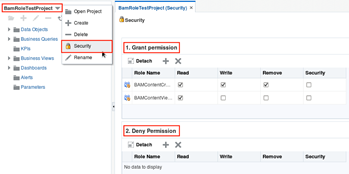
Oracle’s BI application Oracle Business Activity Monitoring (BAM) is the choice to provide Oracle Fusion Middleware (FMW) users with business insights of all running processes and applications. Due to the fact that in a standard Oracle FMW infrastructure multiple applications are hosted on which different user groups are operating one can imagine that not all information should be accessible by all users. At this point user roles and permissions become an important topic within enterprise applications. This article will provide an overview of Oracle BAM Security Concept which can be used to restrict user access to different data and dashboard categories.

Introduction to Oracle BAM Security Concept

BAM is a standard Java EE application. Therefore the same role and access right concepts apply to BAM as to any other Java EE application. When BAM is installed five standard BAM user groups are created in WebLogic standard security realm.

Each group grants a specific set of functionality to its members. The minimum requirement for a user in order to login to BAM is provided by BAMUsers group. All additional groups add more BAM functions for its users:

  • BAMContentViewer – Members can view dashboards in a project
  • BAMContentCreator – Members can create dashboards and other BAM artifacts in a project
  • BAMArchitect – Members can create new BAM Data Objects and Enterprise Message Sources
  • BAMAdministrator – Members can view and modify all resources in any project

Users can be added to user groups accord ing to the required access rights.

Adding additional BAM users

In order to add a new user to BAM one has to add the user to BAMUsers group. Afterwards the user can login. However he is not able to see any projects or access dashboards. Read the complete article here.

SOA & BPM Partner Community

For regular information on Oracle SOA Suite become a member in the SOA & BPM Partner Community for registration please visit www.oracle.com/goto/emea/soa (OPN account required) If you need support with your account please contact the Oracle Partner Business Center.

Blog Twitter LinkedIn image[7][2][2][2] Facebook clip_image002[8][4][2][2][2] Wiki

Performance by using patterns in service implementations by Maarten Smeets

clip_image001


Performance in service oriented environments is often an issue. This is usually caused by a combination of infrastructure, configuration and service efficiency. In this blog article I provide several suggestions to improve performance by using patterns in service implementations. The patterns are described globally since implementations can differ across specific use cases. Also I provide some suggestions on things to consider when implementing such a pattern. They are technology independent however the technology does of course play a role in the implementation options you have. This blog article was inspired by a session at AMIS by Lucas Jellema and additionally flavored by personal experience.
Patterns

Asynchronous services

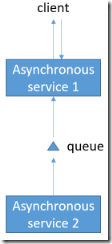
Suppose a synchronous call is made and the system takes a while to process the information. In the mean time the end-user might be waiting for the processing to be completed while the end-user might not (immediately) be interested in the response. Why not make the process asynchronous?

Making a process asynchronous has some drawbacks. The result of the processing of the request will not be available immediately in the front- and back-end so you cannot use this information yet and often you do not know when (and if) the information will become available. If something goes wrong during processing, who will be informed to take measures? (How) does the back-end inform the front-end when it’s done? You can think of server push mechanisms.

Claim-check

This is of course a famous pattern. The claim-check pattern is often used when large objects are used such as large binary files, which you do not want to pull through your entire middleware layer. Often the data is labelled and saved somewhere. The middleware can get a reference to the data. This reference can be send to the place it needs to be and the data can be fetched and processed there.

Set processing

Service calls are expensive since they often traverse several layers of hard- and software. For example I need to fetch data on a lot of persons and I have a service to fetch me person information. I can call this service for every individual person. This can mean a Service Bus instance, a SOA composite instance, a SOA component instance,a database adapter instance, a database connection and fetching of a single item all the way back (not even talking about hard- and software load-balancers). Every instance and connection (e.g. HTTP, database) takes some time. If you can minimize the instances and connections, you obviously can gain a lot of performance. How to do this is more easy than it might seem. Just fetch more than one person in a single request. Read the complete article here.

SOA & BPM Partner Community

For regular information on Oracle SOA Suite become a member in the SOA & BPM Partner Community for registration please visit www.oracle.com/goto/emea/soa (OPN account required) If you need support with your account please contact the Oracle Partner Business Center.

Blog Twitter LinkedIn image[7][2][2][2] Facebook clip_image002[8][4][2][2][2] Wiki

VirtualBox with SOA 12cR2 and StreameXplorer in 33 minutes by Peter van Nes

clip_image002


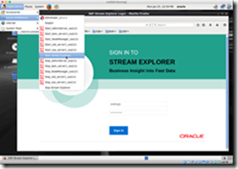
In a previous article, VirtualBox with SOA, BPM, OSB and BAM in 33 minutes, i described how you could quickly create a new Oracle VirtualBox image from scratch with SOA 12cR1. When following the instructions in this article you get almost the same result, only differences are that you will have SOA 12cR2 installed with Oracle StreameXplorer.

Because the preparation is almost the same, follow the instructions in the VirtualBox with SOA, BPM, OSB and BAM in 33 minutes, till the step “Install Oracle Linux”. Only use the Github repository reddipped/soa12cR2install instead of reddipped/soa12cR1install. Continue from there with the following steps to complete the installation.

Install Oracle Db 12c SE2

Now Linux is up and running, logon as Oracle and run the installation script for Oracle DB Standard Edition 2 from the shared folder soa12cR1install/Db12cSE2.

1

2

cd /media/sf_soa12cR2_install/Db12cSE2

./install

Install JDK 8u65

Install Java 8u65 by executing the following commands as Oracle.

1

2

3

sudo -s

rpm -ivh /media/sf_soa12cR2_install/JDK8U65/jdk-8u65-linux-x64.rpm

exit

Create the oraInst.loc

When installing oracle products silently the location of the oracle inventory location should be created. This file specifies the location of the Oracle Inventory directory where the Installer creates the inventory of Oracle products installed on the system. Just cut-and-paste the following instructions as user Oracle. Read the complete article here.

SOA & BPM Partner Community

For regular information on Oracle SOA Suite become a member in the SOA & BPM Partner Community for registration please visit www.oracle.com/goto/emea/soa (OPN account required) If you need support with your account please contact the Oracle Partner Business Center.

Blog Twitter LinkedIn image[7][2][2][2] Facebook clip_image002[8][4][2][2][2] Wiki

SOA Suite 12.2.1 New Features by Sandra Flores

clip_image002


I recently had the opportunity to see version 12.2.1 of Oracle’s SOA Suite in action–and I can say it offers some very nice features that we developers have been waiting for. These features will make our lives much easier, especially when working with Cloud integrations, using REST and locating failures in BPEL instances.

These are some of the new features:

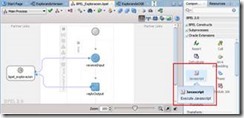
  1. JavaScript support for SOA Composites and OSB Pipelines. Besides REST support for OSB and BPEL (which comes from a previous version), now we have a JavaScript activity for BPEL flows and another one for OSB Pipeline components. With this activity it is possible to handle payload with native and custom functions of this language without converting from JSON to XML (i.e., we are able to create REST BPEL orchestrations and OSB flows using JSON and work with this structure in a natural way with JavaScript). You can read more about using JavaScript in SOA Composites in the well-explained and complete article found here: https://technology.amis.nl/2015/11/02/soa-suite-12-2-1-a-first-look-at-end-to-end-json-and-javascript-support-in-soa-composites/.
  2. XSLT Mapping Debug. XSLT transformations now have debug functionality. We can set breakpoints to check a function’s input and output data at runtime. This feature is available for applications deployed in local and remote servers, and for BPEL and Mediator components as well as for OSB projects.
  3. Oracle Integration Continuous Availability. This complete solution comprises a set of SOA Suite operative functionality, including diagnosis, performance, availability, scalability among other operative aspects. Its main purpose is to provide tools and capabilities to solve issues arising from failures and improve our implementations. The following are part of this group:

In-Memory SOA. When we create a BPEL in JDev, a new tab called In-Memory SOA lets us choose from three persistence options: immediate, deferred and faulted. This functionality uses Coherence cache associated with WebLogic Server to run non-transactional short-running BPEL processes in-memory. This helps improve performance, lighten the DB job and make its maintenance easier. State data is stored and read from Coherence cache according to the option we choose: Read the complete article here.

SOA & BPM Partner Community

For regular information on Oracle SOA Suite become a member in the SOA & BPM Partner Community for registration please visit www.oracle.com/goto/emea/soa (OPN account required) If you need support with your account please contact the Oracle Partner Business Center.

Blog Twitter LinkedIn image[7][2][2][2] Facebook clip_image002[8][4][2][2][2] Wiki

Where Is SOA Going? By Bob Rhubart

clip_image001


SOA principles drive new focus.

Service-oriented architecture (SOA) has been a topic of conversation among IT professionals since before phones got smart and the word cloud referred to something other than airborne water vapor. While the basic concept of SOA hasn’t really changed, perceptions and practices around implementing SOA continue to evolve.

Services are everywhere, and with this burst of cloud, mobile, and API initiatives, SOA couldn’t be in better shape.

Rolando Carrasco,
SOA Principal Architect and Co-Owner, S&P Solutions

To get a sense of how that evolution is playing out among people who work in SOA, I put the following question to the community via an Oracle Technology Network discussion forum: Where is SOA going?

As it happens, three of the most detailed responses came from the authors of the book Oracle API Management 12c Implementation. That’s particularly fitting, given that their book’s general subject matter, API management—always a factor in SOA—has taken on even greater significance as the use of cloud-based services becomes increasingly prevalent in enterprise IT.

Oracle ACE Director Luis Weir, the book’s lead author and the principal architect at HCL Industries, is confident of a solid and rosy future for SOA as an architectural concept. But he thinks how we talk about it is changing.

“SOA has been reborn in the form of ‘digital technologies’ such as IoT [Internet of Things], API management, microservices, and cloud integration solutions,” Weir says.

Among those digital technologies, API management looms large as a connecting thread. In a post on his blog, Weir defines the term API management as “the discipline that governs the software development lifecycle of APIs. It defines the tools and processes needed to build, publish, and operate APIs.” Given that APIs provide the means for connection and interaction between services—in the cloud and elsewhere—the elevated role API management plays in today’s SOA is understandable. Read the complete article here.

SOA & BPM Partner Community

For regular information on Oracle SOA Suite become a member in the SOA & BPM Partner Community for registration please visit www.oracle.com/goto/emea/soa (OPN account required) If you need support with your account please contact the Oracle Partner Business Center.

Blog Twitter LinkedIn image[7][2][2][2] Facebook clip_image002[8][4][2][2][2] Wiki

Salesforce to SAP Integration with Oracle ICS


clip_image001

Watch the video here.

SOA & BPM Partner Community

For regular information on Oracle SOA Suite become a member in the SOA & BPM Partner Community for registration please visit www.oracle.com/goto/emea/soa (OPN account required) If you need support with your account please contact the Oracle Partner Business Center.

Blog Twitter LinkedIn image[7][2][2][2] Facebook clip_image002[8][4][2][2][2] Wiki

Preparing & installing the ICS on-premises Connectivity Agent by Robert van Molken

clip_image002


In this second article about the Connectivity Agent we deep-dive into the details. We take a look in preparing and installing the agent. This is done in combination with Integration Cloud Service. For more information about the architecture and inner workings of the agent I recommend to read this article first.

What is the Connectivity Agent?

Basically it is a gateway between cloud and on-premises. The Agent eliminates common security and complexity issues previously associated with integrating on-premises applications from outside the firewall. With the agent it is possible for example to connect with an on-premises database or ERP application using the existing JCA adapter framework.

Downloading the Connectivity Agent

There are a few steps in installing the agent. First the installer can only be downloaded from your Integration Cloud Service instance. Secondly the installer can only be run on a linux environment. Thirdly some settings can be tuned / changed after installation.

Downloading the Agent

The agent first need to be downloaded from Integration Cloud Service. Login into your ICS instance and navigate to the Agents page.


At the top-right corner the user can find the “Download Agent installer” button. When clicking on the button it will show two options; the connectivity and execution agent. This article describes the first option. The second agent is evenly interesting, because it will install an instance of Integration Cloud Service on-premises. More details on this agent at a later time. Read the complete article here.

SOA & BPM Partner Community

For regular information on Oracle SOA Suite become a member in the SOA & BPM Partner Community for registration please visit www.oracle.com/goto/emea/soa (OPN account required) If you need support with your account please contact the Oracle Partner Business Center.

Blog Twitter LinkedIn image[7][2][2][2] Facebook clip_image002[8][4][2][2][2] Wiki

E-Business Suite Integration with Integration Cloud Service and DB Adapter by Ulrich Janke

clip_image002


Introduction

Integration Cloud Service (ICS) is an Oracle offering for a Platform-as-a-Service (PaaS) to implement message-driven integration scenarios. This article will introduce into the use of ICS for integrating an on-premise E-Business Suite (EBS) instance via Database Adapter. While EBS in recent releases offers a broad set of integration features like SOAP and REST support (i.e. via Integrated SOA Gateway), these interfaces are not available in older versions like 11.5.x. In the past it has been a proven approach to use Oracle Fusion Middleware Integration products (SOA, OSB etc.) running on-premise in a customer data center to connect to an EBS database via DB Adapter. In a short time this feature will be available also in a cloud based integration solution as we will discuss in this article.

Unless we focus on EBS integration here the DB Adapter in ICS will work similarly against any other custom database. Main reason to use an EBS context is the business case shown below, where ICS is connected to Mobile Cloud Service (MCS) to provide a mobile device solution.

Business Case and Architecture

Not hard to imagine that Oracle customers running EBS 11.5.x might have a demand to add a mobile channel for their end-users. One option could be an upgrade to a recent release of EBS. As this will be in most cases a bigger project, an alternative could be the creation of a custom mobile solution via Oracle Jet and MCS as figured below. MCS is a PaaS offering and requires access to an underlying database via REST/JSON. This is the situation where ICS appears in this architecture.

In absence of native SOAP or REST capabilities being available in EBS 11.5.x tech stack, the integration via ICS would close that gap. Any database access activities (retrieving data, CRUD operations etc.) can run via an ICS/DB Adapter connection to an EBS on-premise database. ICS itself will provide a REST/JSON interface for the external interaction with EBS. This external interface is generic and not restricted to MCS as caller at all. However in our business case the ICS with DB Adapter fulfills the role of a data access layer for a mobile solution. Read the complete article here.

SOA & BPM Partner Community

For regular information on Oracle SOA Suite become a member in the SOA & BPM Partner Community for registration please visit www.oracle.com/goto/emea/soa (OPN account required) If you need support with your account please contact the Oracle Partner Business Center.

Blog Twitter LinkedIn image[7][2][2][2] Facebook clip_image002[8][4][2][2][2] Wiki

Integration Cloud Service (ICS) On-Premise Agent Installation by Greg Mally

clip_image002


The Oracle On-Premises Agent (aka, Connectivity Agent) is necessary for Oracle ICS to communicate to on-premise resources without the need for firewall configurations or VPN. Additional details about the Agent can be found under New Agent Simplifies Cloud to On-premises Integration. The purpose of this A-Team blog is to give a consolidated and simplified flow of what is needed to install the agent and provide a foundation for other blogs (e.g., E-Business Suite Integration with Integration Cloud Service and DB Adapter). For the detailed online documentation for the On-Premises Agent, see Managing Agent Groups and the On-Premises Agent.

On-Premises Agent Installation

The high-level steps for getting the On-Premises Agent installed on your production POD consist of two activities: 1. Create an Agent Group in the ICS console, and 2. Run the On-Premises Agent installer. Step 2 will be done on an on-premise Linux machine and the end result will be a lightweight WebLogic server instance that will be running on port 7001.

Create an Agent Group Read the complete article here.

SOA & BPM Partner Community

For regular information on Oracle SOA Suite become a member in the SOA & BPM Partner Community for registration please visit www.oracle.com/goto/emea/soa (OPN account required) If you need support with your account please contact the Oracle Partner Business Center.

Blog Twitter LinkedIn image[7][2][2][2] Facebook clip_image002[8][4][2][2][2] Wiki

Implementing an SFDC Upsert Operation in ICS by Ricardo Ferreira Leave a Comment

clip_image002


Introduction

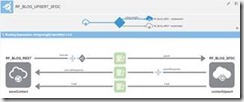
While designing SOA services; especially those ones that represent operations around a business object, a common implementation pattern used is upsert. Upsert is an acronym that means the union of “update plus insert”. The idea behind is having a unique operation that decides which action to take – either update the existing record or insert a new one – based on information available in the message. Having one operation instead of two, makes the SOA service interface definition clearer and simpler.

Some SaaS applications offer upsert capabilities in their exposed services, and leveraging these capabilities can considerably decrease the amount of effort required while designing SOA services in an integration platform such as ICS. For instance, if you need to develop an upsert operation and the SaaS application does not have this functionality; you will have to implement that logic using some sort of conditional routing (see Content-Based Router pattern) or via multiple update and insert operations.

Salesforce.com (or SFDC for short) is one of those SaaS applications that offers built-in support for the upsert operation. This post will show how to leverage this support with ICS. Read the complete article here.

SOA & BPM Partner Community

For regular information on Oracle SOA Suite become a member in the SOA & BPM Partner Community for registration please visit www.oracle.com/goto/emea/soa (OPN account required) If you need support with your account please contact the Oracle Partner Business Center.

Blog Twitter LinkedIn image[7][2][2][2] Facebook clip_image002[8][4][2][2][2] Wiki