Content-Based Routing with Integration Cloud Service by Robert van Molken

clip_image002

In my previous article I discussed the fall updates of Integration Cloud Service. One of the features in this update is the possibility for content-based routing within integrations. I came across this feature during UKOUG Tech 15 in the beginning of December. In an two our hands-on lab I had some time to play with the content-based routing feature. The amazing thing is that it did it all on my iPad. In this article I will describe the feature and the steps to implement a common use-case.

What does Content-Based Routing mean?

The fall updates introduced content-based routing, which essentially mean that based on a value in the payload a different flow is executed. A use-case for this type of routing is the possibility to retrieve data from a different application based on the country code. With Integration Cloud Service is as easy as adding a filter on the request operation of the source connection.

Step 1: Adding a filter to route on

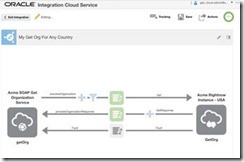
The first step is adding a filter to route the request on. To demonstrate this I’m using an already existing integration. This integration receives a GET request for retrieving the information of an organization. The current integration always retrieves the organization from the US site.

To add a filter a user would click on the funnel icon. Clicking on this icon will open the Expression Builder. In the Expression Builder a user can set an expression to filter requests on. This can simply be done by drag n drop the field to filter on. Read the complete article here.

SOA & BPM Partner Community

For regular information on Oracle SOA Suite become a member in the SOA & BPM Partner Community for registration please visit www.oracle.com/goto/emea/soa (OPN account required) If you need support with your account please contact the Oracle Partner Business Center.

Blog Twitter LinkedIn image[7][2][2][2] Facebook clip_image002[8][4][2][2][2] Wiki

Starting out with Oracle SOA CS – my first steps on a fairly advanced PaaS service by Lucas Jellema on January


clip_image002One of the platform offerings in the Oracle Public Cloud is the SOA Cloud Service. This service offers various flavors of SOA Suite 12c (Service Bus, SOA Suite, Technology Adapters) and API Manager 12c, automatically provisioned on the cloud. This service builds on top of a pre-existing DBaaS instance and Storage CS container and implicitly creates a JCS instance and several compute nodes on IaaS Compute CS – as shown in the figure to the right.

This article describes my first steps in getting started with SOA CS. In less than two hours, I had my first simple Service Bus project running on the SOA CS instance. From SoapUI on my local laptop, I could run a load test against the service exposed by the Service Bus, accessed via the automatically provisioned Load Balancer. The average response time was 60 ms, consisting to a large extent of the network latency from my laptop to Oracle’s data center.

Preparation

Before you can request provisioning of a SOA CS instance, you need to have gone through some preparations (also see documentation):

  • you need a (trial) subscription to SOA CS
  • you need a running DBaaS instance – a database instance that will host the SOA Infra schema, the MDS schema and other SOA Suite components (see this article about preparing such as DBaaS instance)
  • you need a (trial) subscription to Storage Cloud Service and you need to prepare a storage container on this service – to host the back ups of the SOA CS instance
  • you need to have prepared an SSH public/private key pair (which you also need to do for the DBaaS instance) and have access to the public key

Additionally, you need to decide what kind of environment you want to have provisioned: just SOA [SCA engine} or just Service Bus – or both? A single node environment or a multi-node cluster? Do you also [or only]need API Manager? The provision wizard will ask you for the answers to these questions.

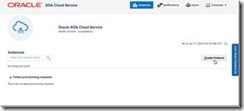
The starting situation before running the provision wizard is shown here:

I have navigated to the Service Console for the SOA CS service in my identity domain. It would list all my instances – if I had any. Since I do not, all I can do is press the Create button to start a request to have an instance provisioned for me: The first step is the selection of the Domain Type. The options are self explanatory. Read the complete article here.

SOA & BPM Partner Community

For regular information on Oracle SOA Suite become a member in the SOA & BPM Partner Community for registration please visit www.oracle.com/goto/emea/soa (OPN account required) If you need support with your account please contact the Oracle Partner Business Center.

Blog Twitter LinkedIn image[7][2][2][2] Facebook clip_image002[8][4][2][2][2] Wiki

Integration Cloud Service free online training & free presales certification

clip_image002


Integration Cloud Service Guided Learning path was created to provide the presales consultant with a detailed understanding of key product features to prepare him/her to do product demos and be involved in proof-of-concept projects.

It starts with the ICS product overview and moves into technical details with short modules on:

· Integrating Applications with Oracle Integration Cloud Service (4 mins)

· Connecting to Applications with Oracle Integration Cloud Service (3 mins)

· Creating Connections in Oracle Integration Cloud Service (2 mins)

· Creating Integrations in Oracle Integration Cloud Service (3 mins)

· Mapping Data in Oracle Integration Cloud Service (2 mins)

· Mapping Data Between Applications with Oracle Integration Cloud Service (3 mins)

· Monitoring Integrations in Oracle Integration Cloud Service (2 mins)

· Monitoring Integrations (2 mins)

· Packaging Integrations with Oracle Integration Cloud Service (2 mins)

· Using Packages in Integration Cloud Service (4 mins)

· Using Lookups in Oracle Integration Cloud Service (2 mins)

· Integrating Oracle RightNow and Oracle Sales Cloud Using Oracle Integration Cloud Service (6 mins)

After going through these on-line modules, you can test what you learnt by taking the assessment test at the end. Attend the online training here.

SOA & BPM Partner Community

For regular information on Oracle SOA Suite become a member in the SOA & BPM Partner Community for registration please visit www.oracle.com/goto/emea/soa (OPN account required) If you need support with your account please contact the Oracle Partner Business Center.

Blog Twitter LinkedIn image[7][2][2][2] Facebook clip_image002[8][4][2][2][2] Wiki

ServiceCloud Rightnow Integration, XSLT Transformations! By Fabio Persico

clip_image002


I’ve just roll out to a live environment, a SOA Integration project with Oracle Service Cloud Rightnow.

The customer needed to migrate from a in-house CRM to Oracle Service Cloud and with my company Infomentum we have helped them in taking this big step. Since that I have made lots of experience with OSC WebServices.

Here I just want to share the complex XSLT Transformation which we have implemented to communicate with the OSC WebServices, hopefully these can speed up any other SC integration projects.

There are 6 transformation in the ZIP package (we have implemented more):

XSLT Name

SC Object

Out of the box Object?

Operation Type

xsltContact2Update

CONTACT

Yes

UPDATE

xsltOrganisationToUpdate

ORGANIZATION

Yes

UPDATE

xsltProgrammeToUpdate

CO.PROGRAMME

No

UPDATE

xsltProgrammeTypeToUpdate

CO.PROGRAMMETYPE

No

UPDATE

xsltCourseToUpdate2

CO.COURSE

No

UPDATE

xsltSessionToUpdate

CO.SESSION

No

UPDATE

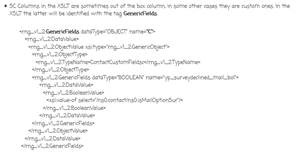
In the XSLTs you’ll find all the details about the TARGET columns (Oracle Service Cloud ones). Here are some important concepts I want to highlight:

  • SC Columns in the XSLT are sometimes out of the box column, in some other cases they are custom ones. In the XSLT the latter will be identified with the tag GenericFields. Read the complete article here.

SOA & BPM Partner Community

For regular information on Oracle SOA Suite become a member in the SOA & BPM Partner Community for registration please visit www.oracle.com/goto/emea/soa (OPN account required) If you need support with your account please contact the Oracle Partner Business Center.

Blog Twitter LinkedIn image[7][2][2][2] Facebook clip_image002[8][4][2][2][2] Wiki

Pre-built Virtual Machine for SOA Suite 12.2.1.1.0

image

Overview

Please note that this appliance is for testing purposes only, as such it is unsupported and should not to be used in a production environment.

This VirtualBox appliance contains a fully-configured, ready-to-use SOA Suite 12.2.1.1.0 installation.

All you need is to install Oracle VM VirtualBox on your desktop/laptop and import the SOA Suite appliance and you are ready to try out SOA Suite 12.2.1.1.0 — no installation and configuration required!

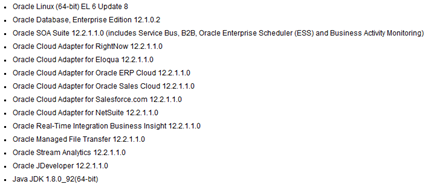
The following software is installed in this VirtualBox image:

Please check the Introduction and Readme document for detailed instructions on downloading and importing the VirtualBox image. Get the download here.

SOA & BPM Partner Community

For regular information on Oracle SOA Suite become a member in the SOA & BPM Partner Community for registration please visit www.oracle.com/goto/emea/soa (OPN account required) If you need support with your account please contact the Oracle Partner Business Center.

Blog Twitter LinkedIn image[7][2][2][2] Facebook clip_image002[8][4][2][2][2] Wiki

API Cloud Platform Service Introduction – SOA & BPM Partner Community Webcast – August 30th 2016

image


Attend our August edition of the SOA & BPM Partner Community Webcast live on August 30th 2016 at 16:00 CET.

Learn about the API Platform Cloud Service, built for modern API Management!
Come learn about our new API Platform Cloud Service and how it provides the modern API Management Experience!  Robert Wunderlich, PM for API Management and Integration will join us to discuss this new offering that is coming soon!

  • API Management Service on Oracle Public Cloud
  • Developer Portal that is fully customizable with company branding
  • Integration with an API Design leader
  • Industry proven gateway that can run on Oracle Public Cloud, other clouds and on-premises

Robert Wunderlichimage

Senior Principal Product Manager

LinkedIn & Twitter

Visit the registration page here.

Call ID: 5566478 Call Passcode: 333111

Austria: +43 (0) 192 865 12
Belgium: +32 (0) 240 105 28
Denmark: +45 327 292 22
Finland: +358 (0) 923 193 923
France: +33 (0) 15760 2222
Germany: +49 (0) 692 222 161 06
Ireland: +353 (0) 124 756 50
Italy: +39 (0) 236 008 198

Netherlands: +31 (0) 207 143 543
Spain: +34 914 143 755
Sweden: +46 (0) 856 619 465
Switzerland: +41 (0) 445 804 003
UK: +44 (0) 208 118 1001
United States: 140 877 440 73
More Local Numbers

Schedule:

August 30th 2016 at 16:00-17:00 CET

Visit the registration page here.

Missed our SOA & BPM Partner Community Webcast? – watch the on-demand versions:

· Integration Cloud Service June 28th 2016

· Sales Plays Webcast June 9th 2016

· Real-Time Integration Business Insight May 31st 2016

· Integration Strategy sales and marketing campaign update

· Microservices

· Stream Explorer

· Process Cloud Service V2

· SOA Suite 12.2.1

· Oracle OpenWorld 2015 update

· SOA & API Cloud Service

· Solutions Catalog & Cloud Marketplace

· GSE demo systems

· Hybrid sales plays

For the latest information please visit Community Updates Wiki page (SOA Community membership required).

SOA & BPM Partner Community

For regular information on Oracle SOA Suite become a member in the SOA & BPM Partner Community for registration please visit www.oracle.com/goto/emea/soa (OPN account required) If you need support with your account please contact the Oracle Partner Business Center.

Blog Twitter LinkedIn image[7][2][2][2] Facebook clip_image002[8][4][2][2][2] Wiki

HCL Predictive Maintenance Solution based on IoT Cloud Service

clip_image002


Luis Weir and the HCL team build an excellent PaaS showcase for predictive maintenance.

Predictive Maintenance HCL PaaS Showcase

• Industry value proposition solving a business problem

• PaaS services: IoT, MCS, PCS, ICS

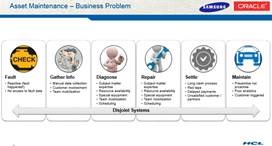
Industries such as aeronautics, automotive, manufacturing, high-tech and even healthcare always deal with the management of thousands of assets. This activity is complex in very costly. Even more so due to manual business processes and disconnected systems (many of them legacy). HCL’s ServiSmart solution reduces costs by connecting assets into a streamlined and pre-built end-to-end digital business process to automate tasks such as fault recognition and diagnosis, work allocation, repairs tracking and ongoing maintenance. Watch the video here.

SOA & BPM Partner Community

For regular information on Oracle SOA Suite become a member in the SOA & BPM Partner Community for registration please visit www.oracle.com/goto/emea/soa (OPN account required) If you need support with your account please contact the Oracle Partner Business Center.

Blog Twitter LinkedIn image[7][2][2][2] Facebook clip_image002[8][4][2][2][2] Wiki

SOA Suite 12c Administrator’s Guide Released


clip_image002Your blogger, for the past few years have piled up more things that he can chew.  As a result the blog posts have dried up a little as blogging involves both time and novelty and I have been a little short on the first lately. Of that may activities that consumed me, none was more time taking, challenging and difficult as writing the Oracle SOA Suite 12c Administrator’s Guide . The book was announced a month ago and is finally out and available. Here is a sneak peak a the cover.

Oracle SOA Suite 12c is the most comprehensive and integrated infrastructure on the market today that is used for building applications based on service-oriented architecture. With the vast number of features and capabilities that Oracle SOA Suite 12c has to offer comes numerous complexities and challenges for administration. Oracle SOA Suite 12c Administrator’s Guide covers all the core areas of administration needed for you to effectively manage and monitor the Oracle SOA Suite environment and its transactions, from deployments, to monitoring, to performance tuning, and much, much more.

Manage, monitor, and troubleshoot SOA composites and OSB services from a single product set. Understand core administrative activities such as deployments, purging, startup and shutdown, configuration, backup, and recovery. Also learn about new features such as Oracle Enterprise Scheduler, lazy loading, work manager groups, high availability, and more. Get the SOA Administrator’s Guide here. For additional SOA books visit our wiki here.

SOA & BPM Partner Community

For regular information on Oracle SOA Suite become a member in the SOA & BPM Partner Community for registration please visit www.oracle.com/goto/emea/soa (OPN account required) If you need support with your account please contact the Oracle Partner Business Center.

Blog Twitter LinkedIn image[7][2][2][2] Facebook clip_image002[8][4][2][2][2] Wiki

SOA 12c QuickTip: Enable Servicebus message tracing in DefaultDomain by Sven Bernhardt


clip_image001Messsage or execution tracing in Servicebus (SB) allows insight into the message exchange between Servicebus and it’s communication partners (Client applications and Service providers) as well as the message processing within  a pipeline. Informations about incoming and outgoing messages, the corresponding headers, the course of variable manipulations and other things are written to the diagnostic logs and can be inspected there, when the tracing is active. By default the message and execution tracing are disabled, due to performance reasons and so it should only be enabled in development environments for debugging purposes.

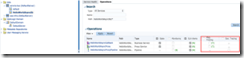
Enablement of message tracing for proxy or business service or execution tracing on the pipeline level, can be done using Fusion Middleware Control (Enterprise Manager).Under a specific SB project, the corresponding services and pipelines can be found. Enabling the tracing can be simply done by checking the options for message tracing respectively execution tracing in the Operations tab. Read the complete article here.

SOA & BPM Partner Community

For regular information on Oracle SOA Suite become a member in the SOA & BPM Partner Community for registration please visit www.oracle.com/goto/emea/soa (OPN account required) If you need support with your account please contact the Oracle Partner Business Center.

Blog Twitter LinkedIn image[7][2][2][2] Facebook clip_image002[8][4][2][2][2] Wiki

How to terminate an instance after transaction rollback and return response to caller by Rajeev Misra

clip_image002We have seen in several customer scenarios where a Parent BPEL process calls a child BPEL process asynchronously.  If child process runs into any kind of business or system fault,  fault handler sends callback to parent process with failure information.   Please note, since parent had invoked child process asynchronously,  child can’t throw fault back to parent.  Callback is only mechanism to inform parent about the failure in child process execution during asynchronous interaction.   This pattern works fine if transaction of child process is not getting rolled back.   If child process encounters some error where underlying JTA transaction is marked for rollback,  callback may not reach parent process if parent and child are collocated.   This is because,  callback invoke from child to parent will use the child’s JTA transaction to save callback in dehydration store, but since child’s transaction is in rollback state,  callback message information would be rolled back from dehydration store after JTA transaction rolls back.

Second issue is while trying to terminate an instance after it has encountered error which results into transaction rollback.  Since terminate state update of instance in dehydration store will be rolled back with transaction, any attempt to execute terminate in fault handler will be futile.

We are recommending a pattern that could help resolve both of above problems. Please look at the flow: Read the complete article here.

SOA & BPM Partner Community

For regular information on Oracle SOA Suite become a member in the SOA & BPM Partner Community for registration please visit www.oracle.com/goto/emea/soa (OPN account required) If you need support with your account please contact the Oracle Partner Business Center.

Blog Twitter LinkedIn image[7][2][2][2] Facebook clip_image002[8][4][2][2][2] Wiki