SOA & BPM 12.2.1 Installation and Configuration Workshop by John VanSant


clip_image002Overview of Workshop

This workshop will guide the participant through the installation of a non-development environment for SOA and BPM Suite v12.2.1. This workshop won’t cover the installation of the SOA Quickstart install, but the installation of the production software. Some notable differences between the Quickstart install and production bits are:

  • The Quickstart installer doesn’t require an Oracle Database but uses a Java Database. In order to use BAM, an Oracle Database is required so the edelivery installation packages should be used if BAM is going to be used with SOA and/or BPM.
  • The Quickstart installer limits domains to a single managed server.
  • The Quickstart installer doesn’t support B2B domains.
  • The Quickstart installer also doesn’t support the ESS (Enterprise System Scheduler)

The overall steps in this workshop are:

1. Download the software and install Java SE

2. Install Fusion Middleware 12c Foundation

3. Install Oracle Database 12c Enterprise Edition

4. Install SOA and BPM Suite 12c

5. Patch the SOA and BPM 12c installation

6. Create the required Database Schemas to support a domain

7. Create & Configure a test domain

8. Smoke-test the new domain

Read the complete article here. (Community membership required)

SOA & BPM Partner Community

For regular information on Oracle SOA Suite become a member in the SOA & BPM Partner Community for registration please visit www.oracle.com/goto/emea/soa (OPN account required) If you need support with your account please contact the Oracle Partner Business Center.

Blog Twitter LinkedIn image[7][2][2][2] Facebook clip_image002[8][4][2][2][2] Wiki

Flex Fields : Lesson 6: Promoting Flex Fields Mappings and Labels Across Environments by Jaideep


clip_image002When you promote your application from one environment to another, from example from ‘Development’ to ‘Test’ or from ‘Test’ to ‘Production’, it can be a lot of work to have to recreate all the flex field mappings and labels manually in each target environment. To make this easier, Oracle provides a Data Migrator ant script to promote Flex Field mappings and labels from one environment to another. This video is an excerpt from one of our Oracle BPM Training courses. It walks you through how to use the Data Migrator ant script. Watch the video here.

SOA & BPM Partner Community

For regular information on Oracle SOA Suite become a member in the SOA & BPM Partner Community for registration please visit www.oracle.com/goto/emea/soa (OPN account required) If you need support with your account please contact the Oracle Partner Business Center.

Blog Twitter LinkedIn image[7][2][2][2] Facebook clip_image002[8][4][2][2][2] Wiki

JDeveloper 12c becomes slow while editing BPM Process by Tiago Teixeira


There is a known issue with JDeveloper 12c while working on a BPM Process where JDeveloper becomes very slow while editing the process.
A simple drag and drop of an activity or a data association becomes a real pain and it seems as if JDeveloper is constantly working on the background.
To improve this I have two suggestions. The first one will not solve the issue but will help. The second will take away all your frustration!

  1. Remove the auto-build on save action
    1. Go to Tools → Preferences
    2. Search for save actions
    3. Remove the Build Project after Save from the list
  2. Apply patch # 18964763 to your JDeveloper 
    1. Download patch # 18964763 from My Oracle Support
    2. Follow the installation instructions to install the patch with OPatch
  3. Read the complete article here.

SOA & BPM Partner Community

For regular information on Oracle SOA Suite become a member in the SOA & BPM Partner Community for registration please visit www.oracle.com/goto/emea/soa (OPN account required) If you need support with your account please contact the Oracle Partner Business Center.

Blog Twitter LinkedIn image[7][2][2][2] Facebook clip_image002[8][4][2][2][2] Wiki

Escalate task after expiration time in BPM by Waslley Souza

clip_image001In Oracle BPM 12c, when you have a priority activity that you need to be resolved at a specified time to fulfill your SLA (Service Level Agreement), you can escalate it. Let’s learn how to do it!

As a starting point, I will use the BPM application created here: Creating BPM Process with BPM Composer.

I created three users: peter, bruce and clark. Clark is the manager of Bruce, and Bruce is the manager of peter.

In the process, add a new swimlane and change the role to Process Reviewer.
Add an User Task between Initiator and End Events.

Double-click on User Task and click on Add button near Human Task field.
Name it as EmployeeApprovalHT. Read the complete article here.

SOA & BPM Partner Community

For regular information on Oracle SOA Suite become a member in the SOA & BPM Partner Community for registration please visit www.oracle.com/goto/emea/soa (OPN account required) If you need support with your account please contact the Oracle Partner Business Center.

Blog Twitter LinkedIn image[7][2][2][2] Facebook clip_image002[8][4][2][2][2] Wiki

Suppress Approval Controls from BPM Workspace 12c – Hidden Feature by Antonis Antoniou


clip_image002I recently came across a very interesting discussion on the Oracle BPM forum which stimulated my interest for investigation; how to suppress the human task custom outcomes from the action bar in the BPM Workspace application in 12c!
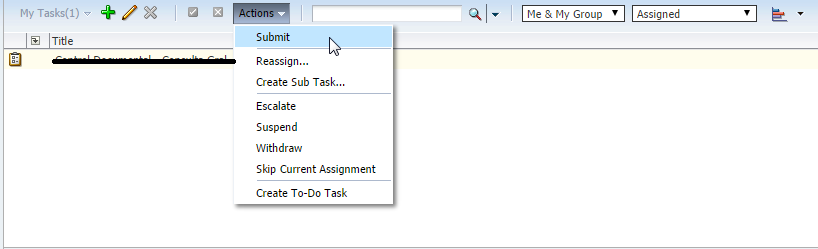
When you deploy a BPM process or a BPEL service that includes a human task component, the BPM Workspace will automatically include in its action bar the custom outcomes that you have defined on your human task.

In the image above it’s assumed that a composite has been deployed that includes a human task component that defines a custom outcome "Submit".
There are cases though that you might want to suppress this default behavior and not have your custom actions appearing in the actions list but just have them displayed in the task details.
In 11g this was "officially" supported with a checkbox option ("Show approval controls in task details only") in the advanced human task properties. Read the complete article here.

SOA & BPM Partner Community

For regular information on Oracle SOA Suite become a member in the SOA & BPM Partner Community for registration please visit www.oracle.com/goto/emea/soa (OPN account required) If you need support with your account please contact the Oracle Partner Business Center.

Blog Twitter LinkedIn image[7][2][2][2] Facebook clip_image002[8][4][2][2][2] Wiki

BPM Suite 12c: Oracle Adaptive Case Management: Monitoring Case Events by Maarten Smeets


clip_image002Adaptive Case Management (ACM) is an interesting addition to Oracle BPM Suite which has been introduced in 11.1.1.7. Adaptive Case Management is suitable to model complex work-flows in which there is no set order of activities taking place. This allows more control to the end user on what to do when.
When a case is started, it is a running process in the SOA infrastructure. The main component is Oracle Business Rules which governs (among other things) the availability of activities and when certain process milestones are achieved. The case API allows you to query the case events and milestones (how you can expose the API as a service is described here and here by Roger Goossens).
Sometimes people want to obtain information about cases such as;

  • in how many cases has a certain activity been executed?
  • in which cases has a certain milestone been reached?

Cases can crash, be restarted, migrated, aborted, purged, etc. Sometimes you might not want to depend on the running case being there to provide the information you want. Also using the API every time you want certain information might put a serious strain on your system. Using sensors or BAM might help but they require an investment to implement and are still manual implementations with no guarantee you can obtain information in the future you did not think you would need in the present/past.

Publish Case Events
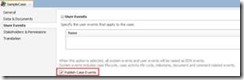
Luckily Oracle has provided the perfect solution for monitoring case events! You can publish case events to the Event Delivery Network (read here 31.17.2 How to Publish Case Events). This can easily be monitored by for example a BPEL process, which can store the information in a custom table. Read the complete article here.

SOA & BPM Partner Community

For regular information on Oracle SOA Suite become a member in the SOA & BPM Partner Community for registration please visit www.oracle.com/goto/emea/soa (OPN account required) If you need support with your account please contact the Oracle Partner Business Center.

Blog Twitter LinkedIn image[7][2][2][2] Facebook clip_image002[8][4][2][2][2] Wiki

Upgrading Oracle BPM Suite to 12c Videos


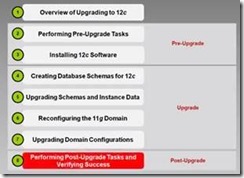
clip_image002Overview of Upgrading to BPM Suite 12c clip_image003

SOA & BPM Partner Community

For regular information on Oracle SOA Suite become a member in the SOA & BPM Partner Community for registration please visit www.oracle.com/goto/emea/soa (OPN account required) If you need support with your account please contact the Oracle Partner Business Center.

Blog Twitter LinkedIn image[7][2][2][2] Facebook clip_image002[8][4][2][2][2] Wiki

Groovy Time! How to use XML dateTime and duration in BPM 12c by Jan Kettenis


clip_image001

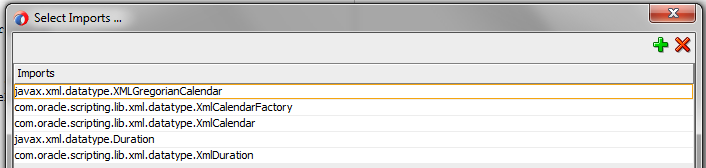
In this article I show some examples of handling XML dateTime and durations in Groovy in the context of a Oracle BPM 12c application. Working with dates and durations in Java has always been painful. Mainly because date and time is a complex thing, with different formats and time zones and all, but I sometimes wonder if it has not been made overly complex. Anyway. Working with XML dates is even more complex because the limited support by XPath functions. Too bad because in BPM applications that work with dates this has to be done very often, and as a result I very often see the need to create all kinds of custom XPath functions to mitigate that.
This issue of complexity is no different for Groovy scripting in Oracle BPM 12c. And let handling of dates be a typical use case for using Groovy scripting because of this limited support by XPath. Therefore, to get you started (and help myself some next time) I would like to share a couple of Groovy code snippets for working with XML dates and durations that may be useful. These example are based on working with the XML dateTime type, and do not handle with the complexity of time zones and different formats. In my practice this is 99% of the use cases that I see.
In my opinion you still should limit using Groovy to handle dates and to the minimum, and rather use custom XPath functions, or create a Java library which you can can import in Groovy. But when you have to, this just might come in handy.

Instantiate an XML Date

If you have an XML element of type dateTime, you use an XmlCalender object. An XmlCalender object with the current time can instantiated as shown below: Read the complete article here.

SOA & BPM Partner Community

For regular information on Oracle SOA Suite become a member in the SOA & BPM Partner Community for registration please visit www.oracle.com/goto/emea/soa (OPN account required) If you need support with your account please contact the Oracle Partner Business Center.

BPM 12c SKIP / BACK Exception Handling Lessons Learned by Dan Atwood

clip_image002

The new Oracle BPM 12c SKIP / BACK feature has some interesting facets that are not commonly known.  This describes what it can be used for as well as three cautions to be aware of when using it.

Use Cases for SKIP / BACK

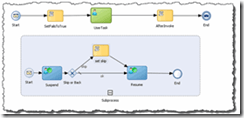
The new Oracle BPM 12c SKIP / BACK feature greatly assists exception handling in a processes. Although Oracle BPM 11g was able to catch exceptions in processes, once caught in an error event subprocess the only option was then to exit the process.  Oracle BPM 12c’s SKIP / BACK gives us some essential functionality we have needed in the product. It not only catches exceptions thrown in a process in an Error event subprocess, but now you are able to:

  • Set the “action” predefined variable to either “skip” or “back” to send the instance back to the point in the process where the exception occurred (“back”) or to send the instance back to the activity after where the exception occurred (“skip”).
  • What is not commonly known is that after the exception is thrown and when the instance is in the event subprocess, variable information can be set in the event subprocess. When the instance is returned to the process, the process payload’s information is changed as well.

To download an Oracle BPM 12c project that demonstrates this new capability click here. Oracle ACE Associate Antonis Antoniou has written an excellent blog post that takes you through the steps needed to create a project with SKIP / BACK:  “Oracle BPM 12c Advanced Error Handling and Recovery – Part 1”.

Three Cautions When Using SKIP / BACK

SKIP / BACK is a powerful new feature, but there are three things you need to be aware of when using it.

  1. As Antonis mentions in his blog, be very careful when using the BACK action. If the original problem has not been corrected that caused the exception to occur in the main process, an infinite loop can easily occur between the work item instance in the process main process and the event subprocess. Read the complete article here.

SOA & BPM Partner Community

For regular information on Oracle SOA Suite become a member in the SOA & BPM Partner Community for registration please visit www.oracle.com/goto/emea/soa (OPN account required) If you need support with your account please contact the Oracle Partner Business Center.

Blog Twitter LinkedIn image[7][2][2][2] Facebook clip_image002[8][4][2][2][2] Wiki

Introduction to BPM 12c Verbal Rules by Jaideep

clip_image002

If you are new to Oracle BPM 12c and want to learn about the new BPM 12c Verbal Rules, this video is for you. If you are completely new to Oracle Business Rules you may want to check our Introduction to Oracle Business Rules first. This video is an excerpt from one of our Oracle BPM Training courses. It walks you through creating a simple verbal rule and then unit testing it JDeveloper 12c. Watch the video here.

SOA & BPM Partner Community

For regular information on Oracle SOA Suite become a member in the SOA & BPM Partner Community for registration please visit www.oracle.com/goto/emea/soa (OPN account required) If you need support with your account please contact the Oracle Partner Business Center.

Blog Twitter LinkedIn image[7][2][2][2] Facebook clip_image002[8][4][2][2][2] Wiki