BPM / SOA 12c: Re-configure a compact domain to use a DB-based MDS instead of a File-based MDS by Sven Bernhardt, Danilo Schmiedel


clip_image001The Oracle SOA Suite and Oracle Business Process Management Suite offers different domain configuration types applicable for different use cases. For details check out the two guides: Installing SOA Suite and Business Process Management Suite Quick Start for Developers as well as Installing and Configuring Oracle SOA Suite and Business Process Management.


Default Domain

Standalone Domain

Compact Domain

Full Domain

Description

Integrated WebLogic Server from JDeveloper

Standalone Admin Server with SOA/BPM

Standalone Admin Server with SOA/BPM

Full installation with separate servers for SOA, OSB, BAM, Admin Server, etc.

Installed via

Quick Start distribution

Quick Start distribution

Quick Start distribution

FMW 12c Infrastructure +
FMW 12c SOA Suite and Business Process Management

Used for

Local development and debugging, especially for demos or evaluation purposes

Local development and debugging, especially for developers who want to use the Oracle Service Bus Design Time Console instead of JDeveloper

Local development with SOA components that are incompatible with JavaDB (ESS, MFT, B2B, Heathcare, BAM, ACM API)

All stages Development (shared), Integration, Test, Production

Repository

Pre-configured Java DB

Pre-configured Java DB

Oracle Database (please note that MDS and OWSM are file-based)

Oracle Database

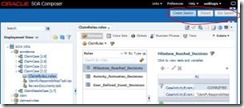
For all of the domain options which are installed via quickstart distributions, SOA and B2B use the MDS file system. This means that the edit function in SOA Composer is not supported and so Business Rules and Domain Value Maps cannot be changed during runtime & without a new deployment . For the development in our projects we very often use the compact domain. The change of business rules without re-deployment is quite important for us because we work a lot with Adaptive Case Management – and there Business Rules and live changes without re-deployment are a key benefit (which we also like to show in demos / POCs / etc.). Read the complete article here.

SOA & BPM Partner Community

For regular information on Oracle SOA Suite become a member in the SOA & BPM Partner Community for registration please visit www.oracle.com/goto/emea/soa (OPN account required) If you need support with your account please contact the Oracle Partner Business Center.

Blog Twitter LinkedIn image[7][2][2][2] Facebook clip_image002[8][4][2][2][2] Wiki

2 Minute Tech Tip: BPM Process Patterns using BPMN

Watch the tech tip with Dan Atwood here.

clip_image002

SOA & BPM Partner Community

For regular information on Oracle SOA Suite become a member in the SOA & BPM Partner Community for registration please visit www.oracle.com/goto/emea/soa (OPN account required) If you need support with your account please contact the Oracle Partner Business Center.

Blog Twitter LinkedIn image[7][2][2][2] Facebook clip_image002[8][4][2][2][2] Wiki

Creating Custom BPM Work List for Human Tasks based in ADF by Mark Peterson


clip_image002If you ever need a custom work list and need to open the human task from this list, then this blog can help you. All you really need to do is find the list of tasks and create the URL that opens the task from the custom work list. This is not as straightforward as it seems since the URL contains some dynamic fields that you will need to derive from information about the tasks.

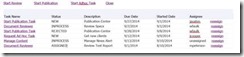
The need for a custom work list usually involves some sort of relationship between instances in a process, or between tasks in different processes such that the OOTB functionality of the BPM workspace is not sufficient. The user wants to see a logical grouping of tasks or between parent and child tasks. These tasks should be shown grouped together. These tasks can be shown in a table or tree format and each task should have a link to click on to open the task directly from the form. This is an example of such a list and grouping.

Use Cases

The relationships between tasks may consist of simple parent/child relationships. The above table was used to implement a custom ACM UI where each of these tasks (children) are activities for a given case (parent). Here a work request (case) with several child tasks, or activities are listed along with the status, description due date, started date and assignee. Notice the links to open the task or reassign the task.

Another example is when a tasks is related to another other (like siblings) by customer or account ID. In all of these examples, the user wants a convenient way to jump directly to the related task, without closing the current task or form, going to the work space, finding and opening the task from the work space. Here are some example users stories this post can help you implement.

  1. As an agent, I want to open a task associated with a leg of a trip from the trip overview page, so I don’t have to search and find the task in the workspace, when I’m working on the trip.
  2. As a user, I want to be able to see all tasks associated with a work requests and be able to open a task to work on it without having to find the task in the workspace when I’m working on the work request.
  3. As a underwriter, I want to be able to see all related line items on a insurance policy and be able to jump to any of these line items from any other line item in the policy without need to find and open the line item from the workspace.
ADF URL Parameters

The URL pattern you need to construct is as follows:

http://hostname:port/faces/adf.task-flow?bpmWorklistTaskId=<TaskId>&adf….

The following parameters needs to be derived and appended to this URL using the amphersand "&" as a delimiter between parameters and an equal sign "=" between the parameter and value. The parameter value pair a listed in the following table. Read the complete article here.

SOA & BPM Partner Community

For regular information on Oracle SOA Suite become a member in the SOA & BPM Partner Community for registration please visit www.oracle.com/goto/emea/soa (OPN account required) If you need support with your account please contact the Oracle Partner Business Center.

Blog Twitter LinkedIn image[7][2][2][2] Facebook clip_image002[8][4][2][2][2] Wiki

Navigating Oracle BAM 12c Composer’s New "Administrator" Page by Ryan Ray


clip_image002With the latest release of Oracle BAM 12c (12.1.3), Oracle has completely redesigned the user interface (UI) and this is the third post in a four part series of posts introducing this new UI.

Part 1 – Introducing the New Oracle BAM 12c Composer

Part 2 – Navigating Oracle BAM 12c Composer’s New "Home" Page

Part 3 – Navigating Oracle BAM 12c Composer’s New "Administrator" Page

Part 4 – (Coming Soon) Navigating Oracle BAM 12c Composer’s New "Designer" Page

In this post, I will give you a brief overview of the new "Administrator" page and hopefully provide you with some insight into the redesign and how to navigate within the new UI.

BAM Composer Administrator Page View

By default, the Administrator page loads with a static image in the main section and with a Navigation Pane on the left-hand side.  With the Navigation Pane you have the option to add, edit/view, delete or refresh the four types of objects using the icons at the top of the Navigation Pane..

BAM Composer Administrator Objects

  • Data Objects
  • Enterprise Message Sources
  • Continuous Queries Monitoring
  • Viewset Monitoring

The Navigation Pane can also be collapsed to provide additional space for the main section.

BAM Composer Data Objects

In the image below you will see the out-of-the-box structure of the BAM Composer Data Objects.  In the fourth post in this series, I will go into further details on the out-of-the-box data objects and their different types. Read the complete article here.

SOA & BPM Partner Community

For regular information on Oracle SOA Suite become a member in the SOA & BPM Partner Community for registration please visit www.oracle.com/goto/emea/soa (OPN account required) If you need support with your account please contact the Oracle Partner Business Center.

Blog Twitter LinkedIn image[7][2][2][2] Facebook clip_image002[8][4][2][2][2] Wiki

BPM 12c Migration – A Hand of Friendship to Oracle BPM 10g by Suyash Khot


There are a lot of benefits to be reaped by migrating a BPM 10g project to 12c. For one, Oracle BPM 12c is built on a Service Component Architecture (SCA) runtime. SCA is an industry standard architecture that provides a model for composing applications that follow SOA principles, like component reuse, OOTB error handling and transaction management, and flexible development to name a few.

With the introduction of Oracle BPM Suite 12c (12.1.3), one of the key features introduced is a migration path for Oracle BPM 10g projects to 12c. Such a feature was not available in 11g and there was little to no hope for BPM 10g projects to be migrated to 11g. That hope has come alive with the introduction of 12c and so I decided to give it a shot. Below I have listed the steps to follow to do a 10g to 12c migration and summarized by findings.

1) Install Oracle BPM Suite 12c

First off, download the Oracle BPM Suite 12c quick start installer from Oracle’s website here. This installer includes JDeveloper 12c with SOA and BPM extensions. The installer also includes the migration utility, which is an ANT task.

2) Install ANT

The migration utility readme.txt recommends to use ANT version 1.8.4.

3) Execute the ANT task

The migration utility can be found under $JDEV_HOME\soa\plugins\jdeveloper\bpm. The build.xml file has all the ANT tasks. The ANT task for the migration from 10g to 12c is “migrate10-12”, where source is the folder location of the 10g project and target is the folder location where the 12c project export will be created. Replace source and target appropriately and execute the below command.

ant migrate10-12 -DprojectLocation=source -Ddestination=target

4) Analyze the ANT task execution

Once the ANT task execution completes successfully, it creates the 12c project export in the target folder specified. This folder contains the following:

  • The exported version of the 12c project (.exp).
  • The migration report (.xml) and its stylesheet (.xsl). Best when viewed via a browser.
  • The 10g project artifacts list (.csv).
  • The folder with 12c project SOA components.
5) Import the 12c project

To import the exported version of the 12c project into JDeveloper, open the 12c JDeveloper. Create a BPM Application. Go to File -> Import  -> Import BPM Project. Browse to the target folder and select the .exp file. This is a list of some of the artifact mappings: Read the complete article here.

SOA & BPM Partner Community

For regular information on Oracle SOA Suite become a member in the SOA & BPM Partner Community for registration please visit www.oracle.com/goto/emea/soa (OPN account required) If you need support with your account please contact the Oracle Partner Business Center.

Blog Twitter LinkedIn image[7][2][2][2] Facebook clip_image002[8][4][2][2][2] Wiki

BPM 12c just got Groovy – A Webcenter Content Transformation Example by Christopher Karl Chan

clip_image002Introduction

On the 27th June 2014 we released Oracle BPM 12c which included some exciting new features.
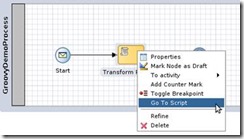
One of the less talked about of new features is the support of BPM Scripting which incorporates the Groovy 2.1 compiler and runtime.

So what is Groovy anyway?

Wikipedia describes Groovy as an object-oriented programming language for the Java platform and you can read the definition here.

In short though it is a Java like scripting language, which is simple to use. If you can code a bit of Java then you can write a bit of Groovy and most of the time only a bit is required.

If you can’t code in groovy yet don’t worry, you can just code in Java and that work most of the time too.

With great power comes great responsibility?

The benefits and possibilities of being able to execute snippets of groovy code in a BPM process execution are almost limitless. Therefore we must be responsible in its use and decide whether it makes sense from a BPM perspective in each case and always implement best practices which leverage the best of the BPM execution engine infrastructure.

If you can easily code, then it is easy to write code to do everything. But this goes against what BPM is all about. We must always first look to leverage the powerful middleware infrastructure that the Oracle BPM execution engine sits on, before we look to solve our implementation challenges with low level code.

One benefit of modelled BPM over scripting is Visibility. We know that ideally BPM processes should be modelled by the Business Analysts and Implemented by the IT department.

Business Process Logic should therefore be modelled into the business process directly and not implemented as low level code that the business will not understand nor be aware of at runtime. In this manner the logic always stays easily visible and understood by the Business. Overuse of logic in scripting will quickly transcend into a solution that will be hard to debug or understand in problem resolution scenarios.

If one argues that the business logic from your business process cannot be modelled directly in the BPM  process, then one should revisit the business process analysis and review whether the design actually makes really makes sense and can be improved.

What could could be a valid usecase for groovy in BPM?

One valid usecase of groovy scripting can be complex and dynamic data transformations. In Oracle BPM 12c we have the option to use the following mechanisms for transformations:

Data Association

Good for:

  • Top level transformations of the same or similar types
  • Simple transformations of a few elements
  • Lists and arrays
  • Performance

Read the complete article here.

SOA & BPM Partner Community

For regular information on Oracle SOA Suite become a member in the SOA & BPM Partner Community for registration please visit www.oracle.com/goto/emea/soa (OPN account required) If you need support with your account please contact the Oracle Partner Business Center.

Blog Twitter LinkedIn image[7][2][2][2] Facebook clip_image002[8][4][2][2][2] Wiki

BPM 10g-12c Migration: Handling Excel Files as Input by Mark Foster

clip_image002Introduction

With the introduction of BPM 12c comes the long-awaited migration tool to migrate BPM 10g projects to BPM 12c.

The A-Team have been heavily involved with the effort to create collateral around this tool – patterns, approaches, samples, tutorials, labs etc.

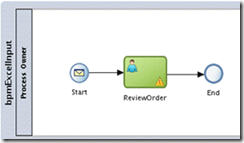
One of the common patterns in BPM 10g is using an Excel spreadsheet as input to a process which led me to investigate how this could be replicated in 12c. What follows is a step-by-step guide to achieving an example of this. Note that this blog will not deliver an enterprise production solution but will at least provide a working example which can be built upon as required.

Approach

Handling files in SOA Suite 11g & 12c is standard functionality with the file and ftp adapters… so we’ll use the file adapter for this example.

Handling CSV files is also straightforward, they can be specified as input in the file adapter wizard… so we can use a CSV file as input to the process.

Apache POI is a standard open source approach to converting Excel to a.n.other file format…. so we can use this to convert the Excel to CSV.

The file adapter and FTP adapter in 12c (and 11g) provide a feature known as “pipelines and valves” for pre-processing (and post-processing) of files prior to delivery to the composite…. so we can use this as the point of conversion for our file.

Given we now know the approach we can begin to build the example….

The Example Project

Examine the Input Spreadsheet / CSV File

We’ll be using a simple excel spreadsheet of orders….

Read the complete article here.

SOA & BPM Partner Community

For regular information on Oracle SOA Suite become a member in the SOA & BPM Partner Community for registration please visit www.oracle.com/goto/emea/soa (OPN account required) If you need support with your account please contact the Oracle Partner Business Center.

Blog Twitter LinkedIn image[7][2][2][2] Facebook clip_image002[8][4][2][2][2] Wiki

BPM Suite 12c Launch Webcast available on-demand

clip_image002

Business processes are at the heart of what makes or breaks a business—and what differentiates it from the competition. Oracle’s Business Process Management Suite that deliver operational efficiency, business visibility, excellent customer experience, and agility give the enterprise an edge over the competition.
To continue your journey with Oracle and learn more about how Oracle can help you deliver on Intelligent Process Management and build Mobile Enterprise Applications please leverage these additional Oracle resources as a thank you:

· Download Presentation

Join the On-Demand Webcast here


SOA & BPM Partner Community

For regular information on Oracle SOA Suite become a member in the SOA & BPM Partner Community for registration please visit www.oracle.com/goto/emea/soa (OPN account required) If you need support with your account please contact the Oracle Partner Business Center.

Blog Twitter LinkedIn image[7][2][2][2] Facebook clip_image002[8][4][2][2][2] Wiki

2 Minute Tech Tip: BPM Process Patterns using BPMN

Watch the tech tip with Dan Atwood here.

clip_image002

SOA & BPM Partner Community

For regular information on Oracle SOA Suite become a member in the SOA & BPM Partner Community for registration please visit www.oracle.com/goto/emea/soa (OPN account required) If you need support with your account please contact the Oracle Partner Business Center.

Blog Twitter LinkedIn image[7][2][2][2] Facebook clip_image002[8][4][2][2][2] Wiki

BPM 12c Gateways (Part 2 of 5): Inclusive Gateway by Antonis Antoniou

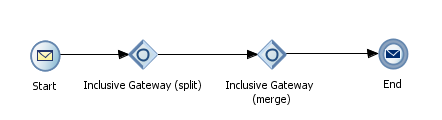
clip_image002The inclusive gateway, just like the exclusive gateway, enables you to split your process into two or more paths. The intrinsic difference between an exclusive gateway and an inclusive gateway is that in an exclusive gateway, the process only continues down one of several paths (if multiple outgoing sequence flows are present) while in an inclusive gateway a process will follow all conditional paths whose expressions are evaluated to true.

Furthermore, in an inclusive gateway a process will only follow the default path only if no conditional expressions evaluate to true. Because of this particular characteristic the notation of an inclusive gateway consist of a split and a merge inclusive gateway.

An inclusive gateway can consist multiple outgoing conditional sequence flows for an inclusive gateway split. However, an inclusive gateway must define a default sequence flow. All conditional expressions that evaluate to true are executed; otherwise the default sequence flow is executed.

At run time, the BPM engine generates a token for each conditional sequence that evaluates to true. If none of the conditional sequence flows evaluate to true then a token gets generated for the default sequence flow. The process will pause and will resume only when all tokens have reached the merge

So let’s see how you can use an inclusive gateway in a process. I have created a new BPM application using the "BPM Application" JDeveloper template and in the "Project SOA Settings" step i have selected "Composite with BPMN Process". Read the complete article here.

SOA & BPM Partner Community

For regular information on Oracle SOA Suite become a member in the SOA & BPM Partner Community for registration please visit www.oracle.com/goto/emea/soa (OPN account required) If you need support with your account please contact the Oracle Partner Business Center.

Blog Twitter LinkedIn image[7][2][2][2] Facebook clip_image002[8][4][2][2][2] Wiki