Importance of Transparency in Government by Kellsey Ruppel

clip_image002

Open government is not a new concept – its modern roots can be traced back to efforts by democratic societies to bring openness to government dealings. In the United States, Freedom of Information Act (FOIA) dates back to the mid 1960’s. Today, most national governments, states, provinces, municipalities and other government jurisdictions have committed to increased transparency. Most recognize that a transparent government is an essential element of a free and democratic society. The White House issued a Memorandum titled “Transparency and Open Government” that states “Openness will strengthen our democracy and promote efficiency and effectiveness in Government.” The memorandum lists three key principles:

  1. Government should be transparent.
  2. Government should be participatory.
  3. Government should be collaborative.

Open Government policies are already helping to contribute to the awareness off citizens and public entities, the success of partnering organizations (such as sub-agencies and authorities) and innovation of new government services. With open data and service policies in place, we are faced with the fundamental requirement to apply those policies to our daily operations as easily and cost-effective as possible.

How is information shared and accessed in State and Local government?

The Sunlight Foundation is a national, nonpartisan, nonprofit organization that uses the tools of civic tech, open data, policy analysis, and journalism to make our government and politics more complete, equitable and effective democratic participation. Let’s use this foundation’s guiding best-practices as a model to lay out how information is being made available for sharing and re-use.

  • Sharing qualitative data in the form of objective reporting
  • Building informative and intuitive websites and mobile apps
  • Providing access to APIs that power existing applications to be re-used by others

In order to deliver these Open Government services, there are intrinsic technology needs to:

  • Secure document collaboration and distribution
  • Rapidly develop mobile friendly user experiences
  • Manage and measure the performance of access to disparate systems
  • Automate self-service requests to data and services

Implementing cloud-based solutions can not only make government more efficient and cost-effective, but also improve the accessibility to information and data.

Oracle and Open Government

Oracle offers a wide variety of Cloud technology and application products that can support government transparency efforts in these key areas:

  1. Technology infrastructure
  2. Information access and presentation
  3. Service performance
  4. Budget/financial Information
  5. Access to Public Documents
  6. Read the complete article here.

SOA & BPM Partner Community

For regular information on Oracle SOA Suite become a member in the SOA & BPM Partner Community for registration please visit www.oracle.com/goto/emea/soa (OPN account required) If you need support with your account please contact the Oracle Partner Business Center.

Blog Twitter LinkedIn image[7][2][2][2] Facebook clip_image002[8][4][2][2][2] Wiki

ServiceCloud Rightnow Integration, XSLT Transformations! By Fabio Persico

clip_image002


I’ve just roll out to a live environment, a SOA Integration project with Oracle Service Cloud Rightnow.

The customer needed to migrate from a in-house CRM to Oracle Service Cloud and with my company Infomentum we have helped them in taking this big step. Since that I have made lots of experience with OSC WebServices.

Here I just want to share the complex XSLT Transformation which we have implemented to communicate with the OSC WebServices, hopefully these can speed up any other SC integration projects.

There are 6 transformation in the ZIP package (we have implemented more):

XSLT Name

SC Object

Out of the box Object?

Operation Type

xsltContact2Update

CONTACT

Yes

UPDATE

xsltOrganisationToUpdate

ORGANIZATION

Yes

UPDATE

xsltProgrammeToUpdate

CO.PROGRAMME

No

UPDATE

xsltProgrammeTypeToUpdate

CO.PROGRAMMETYPE

No

UPDATE

xsltCourseToUpdate2

CO.COURSE

No

UPDATE

xsltSessionToUpdate

CO.SESSION

No

UPDATE

In the XSLTs you’ll find all the details about the TARGET columns (Oracle Service Cloud ones). Here are some important concepts I want to highlight:

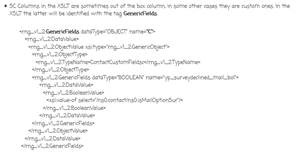
  • SC Columns in the XSLT are sometimes out of the box column, in some other cases they are custom ones. In the XSLT the latter will be identified with the tag GenericFields. Read the complete article here.

SOA & BPM Partner Community

For regular information on Oracle SOA Suite become a member in the SOA & BPM Partner Community for registration please visit www.oracle.com/goto/emea/soa (OPN account required) If you need support with your account please contact the Oracle Partner Business Center.

Blog Twitter LinkedIn image[7][2][2][2] Facebook clip_image002[8][4][2][2][2] Wiki

HCM Cloud – Bulk Integration Automation Using SOA Cloud Service by Jack Desai

clip_image002


Introduction

Oracle Human Capital Management (HCM) Cloud provides a comprehensive set of tools, templates, and pre-packaged integration to cover various scenarios using modern and efficient technologies. One of the patterns is the batch integration to load and extract data to and from the HCM cloud. HCM provides the following bulk integration interfaces and tools:

HCM Data Loader (HDL)

HDL is a powerful tool for bulk-loading data from any source to Oracle Fusion HCM. It supports important business objects belonging to key Oracle Fusion HCM products, including Oracle Fusion Global Human Resources, Compensation, Absence Management, Performance Management, Profile Management, Global Payroll, Talent and Workforce Management. For detailed information on HDL, please refer to this.

HCM Extracts

HCM Extract is an outbound integration tool that lets you select HCM data elements, extracting them from the HCM database and archiving these data elements as XML. This archived raw XML data can be converted into a desired format and delivered to supported channels recipients.

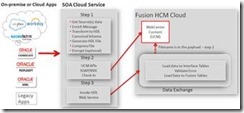
Oracle Fusion HCM provides the above tools with comprehensive user interfaces for initiating data uploads, monitoring upload progress, and reviewing errors, with real-time information provided for both the import and load stages of upload processing. Fusion HCM provides tools, but it requires additional orchestration such as generating FBL or HDL file, uploading these files to WebCenter Content and initiating FBL or HDL web services. This post describes how to design and automate these steps leveraging Oracle Service Oriented Architecture (SOA) Cloud Service deployed on Oracle’s cloud Platform As a Service (PaaS) infrastructure.  For more information on SOA Cloud Service, please refer to this.

Oracle SOA is the industry’s most complete and unified application integration and SOA solution. It transforms complex application integration into agile and re-usable service-based components to speed time to market, respond faster to business requirements, and lower costs.. SOA facilitates the development of enterprise applications as modular business web services that can be easily integrated and reused, creating a truly flexible, adaptable IT infrastructure. For more information on getting started with Oracle SOA, please refer this. For developing SOA applications using SOA Suite, please refer to this.

These bulk integration interfaces and patterns are not applicable to Oracle Taleo.

Main Article

HCM Inbound Flow (HDL)

Oracle WebCenter Content (WCC) acts as the staging repository for files to be loaded and processed by HDL. WCC is part of the Fusion HCM infrastructure.

The loading process for FBL and HDL consists of the following steps:

  • Upload the data file to WCC/UCM using WCC GenericSoapPort web service
  • Invoke the “LoaderIntegrationService” or the “HCMDataLoader” to initiate the loading process.

However, the above steps assume the existence of an HDL file and do not provide a mechanism to generate an HDL file of the respective objects. In this post we will use the sample use case where we get the data file from customer, using it to transform the data and generate an HDL file, and then initiate the loading process.

The following diagram illustrates the typical orchestration of the end-to-end HDL process using SOA cloud service: Read the complete article here.

SOA & BPM Partner Community

For regular information on Oracle SOA Suite become a member in the SOA & BPM Partner Community for registration please visit www.oracle.com/goto/emea/soa (OPN account required) If you need support with your account please contact the Oracle Partner Business Center.

Blog Twitter LinkedIn image[7][2][2][2] Facebook clip_image002[8][4][2][2][2] Wiki

BPM 12c Subprocesses (Part 3 of 3): Event Subprocess by Antonis Antoniou

clip_image001


In this third and last part of a three part series on subprocesses we will explore a special type of subprocess referred to as an “Event” subprocess.
This type of subprocess is triggered by an event that can occur anytime during the execution of a process flow that allows you to interrupt the normal flow of an instance.
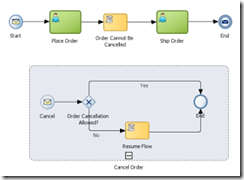
Such capability can be applicable in various use cases. For example, an error might occur in the process, or you can very well define various service level agreements to delineate execution times or you can even have a business requirement to cancel a flow (for example cancel an order).
You can use the “Event” subprocess to implement such requirements (i.e. handle system and business exceptions).
“Event” subprocesses posses various unique characteristics. One of them is that, by configuration, you can have an “Event” subprocess either as interrupting, that is interrupting the normal process flow execution or have an “Event” subprocess running in parallel (concurrently) to the main flow of your process.
Another really nice and useful characteristics of an “Event” subprocess is that it shares the same context as the main flow of the process, meaning that from the “Event” subprocess you can have access to all the data objects that are used by the main process (and of course update their state).
An “Event” subprocess resembles like an embedded subprocess (except that it’s displayed in a dashed-line boarder), however an “Event” subprocess cannot have outgoing or incoming sequence flows. And just as with the other types of subprocesses an “Event” subprocess can define data objects that are local to its scope.We will implement a very simple process that will make use of the event sub-process to simulate the functional use case depicted by the image above; the scenario is straightforward, you can cancel an order as long as it’s not shipped. Read the complete article here.

SOA & BPM Partner Community

For regular information on Oracle SOA Suite become a member in the SOA & BPM Partner Community for registration please visit www.oracle.com/goto/emea/soa (OPN account required) If you need support with your account please contact the Oracle Partner Business Center.

Blog Twitter LinkedIn image[7][2][2][2] Facebook clip_image002[8][4][2][2][2] Wiki

Process Timers – Controlling the time in which your process executes by Jose Rodrigues

clip_image002


Following up a series of questions around setting timers in the Oracle Community forums, I decided to write this article to try and guide their use and how these can be used to control process execution.

Let’s start!

The Use Case

We’ll begin by setting up the scenario in which we’ll have to control our process flow.

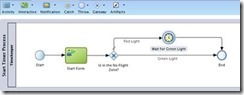
Imagine that you want to have a part of your process that executes immediately if the current time is between 08:00am and 04:00pm (16:00 hours for us Europeans), or wait until 08:00am if it’s outside that interval.

It’s frequent to have some kind of control in parts of the processes, for instance when you want to send SMS to your customers. You certainly don’t want to do it at 03:00am.

How will we make this?

We should use a Catch Timer event, of course, and XPATH’s DateTime functions to check the current time and to set the timer to way for next morning’s 08:00.

The Catch Timer event has several ways to be configured (triggered at specific dates and times, on a specific schedule – every day at 10:28:00 (repeatable), or in a time cycle – every 2 minutes), but we’ll focus on the one where we configure the timer to wait for a specific time and date. More on the others perhaps in another article.

We’ll illustrate the use of timers with an example process. You can, of course, adapt it to your needs.

Defining the execution conditions

So you start by defining a gateway that will split the execution between:

  • Immediate
  • Wait for 08:00am
    • This will have to be split into prior to midnight and after midnight. but for now, we’ll consider the scenario of only two options.

So, you set the expression on the conditional flow that will do the immediate execution, leaving the condition that must wait for 08:00 as the unconditional (default) branch.

The expression should be something like this: Read the complete article here.

SOA & BPM Partner Community

For regular information on Oracle SOA Suite become a member in the SOA & BPM Partner Community for registration please visit www.oracle.com/goto/emea/soa (OPN account required) If you need support with your account please contact the Oracle Partner Business Center.

Blog Twitter LinkedIn image[7][2][2][2] Facebook clip_image002[8][4][2][2][2] Wiki

Business Activity Monitoring videos by Stefan Wörmke


This is a series of 8 short videos explaining how to create a BPM application using Oracle Process Cloud Services. Part 1 will show how to login and create a new application:

clip_image002Part 1

Part 2

Part 3

Part 4

Part 5

Part 6

Part 7

Part 8

The tutorial is also available at our Community blog Business Process Modelling and Business Activity Monitoring by Stefan Wörmcke

SOA & BPM Partner Community

For regular information on Oracle SOA Suite become a member in the SOA & BPM Partner Community for registration please visit www.oracle.com/goto/emea/soa (OPN account required) If you need support with your account please contact the Oracle Partner Business Center.

Blog Twitter LinkedIn image[7][2][2][2] Facebook clip_image002[8][4][2][2][2] Wiki

Getting started with Process Cloud Service by Waslley Souza

clip_image002


If you know and use Oracle BPM Suite, you will like to try the new cloud solution called Oracle Process Cloud Service or PCS. With PCS you can modeling your processes through the cloud without the need to install Oracle BPM Suite. Go to PCS section within the Oracle Cloud website to learn more about or try it: http://cloud.oracle.com/process.

In this post we will create a basic process to create and approve employees.
Download the sample application: CreateEmployeeApplication.zip.

Log in to Oracle Process Cloud Service.
Click Create button, and then select New Application.

Name the application as Create Employee Application.
Select New Space option, and then name it as HR.

In this step, we will create the process and we have many options to create it.
Select the Form Approval Pattern option.

Name the process as Create Employee Process.

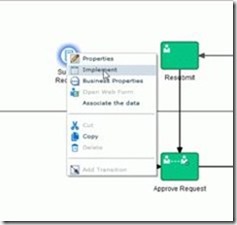
In the Create Employee Process, right-click Submit Request, and then select Implement. Read the complete article here.

SOA & BPM Partner Community

For regular information on Oracle SOA Suite become a member in the SOA & BPM Partner Community for registration please visit www.oracle.com/goto/emea/soa (OPN account required) If you need support with your account please contact the Oracle Partner Business Center.

Blog Twitter LinkedIn image[7][2][2][2] Facebook clip_image002[8][4][2][2][2] Wiki

Introduction to Oracle Internet of Things Cloud Service – Webcast August 23rd 2016

image

Introduction to Oracle Internet of Things Cloud service 16.3.3 and IoT Asset Monitoring Mini-App

Speakers: Harish Gaur and Florian Tournier

Please join the Oracle Product Management team in an introduction to version 16.3.3 of the Oracle Internet Cloud Service. This webcast will provide an overview of the exciting new features available in this release.

It will feature a demo of the new, readily-deployable Asset Monitoring application for rapid integration of IoT device data into asset monitoring workflows.

Schedule: Aug 23, 2016 18-19:00 CET (Berlin time)

For details please visit the registration page here.

SOA & BPM Partner Community

For regular information on Oracle SOA Suite become a member in the SOA & BPM Partner Community for registration please visit www.oracle.com/goto/emea/soa (OPN account required) If you need support with your account please contact the Oracle Partner Business Center.

Blog Twitter LinkedIn image[7][2][2][2] Facebook clip_image002[8][4][2][2][2] Wiki

Red Summer School is on! – run a PaaS workshop for your university!

image


Want to recruit new employees? Want to try PaaS? Run a Summer School training like Link Consulting.

Link Consulting’s Red Summer School on Oracle technologies on the Cloud is on! Teams Alfa, Beta and Delta have been working hard, mentored by our BPM and ECM business manager, Oracle ACE Associate and founder of Red Mavericks, José Rodrigues.

Earlier on this week they learnt the concept of REST APIs using Postman and SoapUI and testing interaction with Twitter API.

They then started working on Database Cloud Service, creating the data model that supports the voting application they’ve started working on today (that allows people to choose the artists that will be performing at a given event – cool, right?) and displaying the REST services on the transactions of these data.

During the last couple of days José introduced students to Oracle ICS and PCS. They built integration between Custom REST API and Gmail API and also with Twitter, this time based on Oracle ICS, and created a simple business process for car loan approvals.

José is satisfied with his students’ motivation: “The students are experimenting these platforms for the first time and really seem to enjoy what they’re doing. At the moment they are starting to connect the pieces and are truly enthusiastic about it.”

You go, teams! It’s been a close race so far. Who will win it? Read the complete article here.

Interested to run a Summer School for your university or customer? Feel free to contact myself.

SOA & BPM Partner Community

For regular information on Oracle SOA Suite become a member in the SOA & BPM Partner Community for registration please visit www.oracle.com/goto/emea/soa (OPN account required) If you need support with your account please contact the Oracle Partner Business Center.

Blog Twitter LinkedIn image[7][2][2][2] Facebook clip_image002[8][4][2][2][2] Wiki

Pre-built Virtual Machine for SOA Suite 12.2.1.1.0

image

Overview

Please note that this appliance is for testing purposes only, as such it is unsupported and should not to be used in a production environment.

This VirtualBox appliance contains a fully-configured, ready-to-use SOA Suite 12.2.1.1.0 installation.

All you need is to install Oracle VM VirtualBox on your desktop/laptop and import the SOA Suite appliance and you are ready to try out SOA Suite 12.2.1.1.0 — no installation and configuration required!

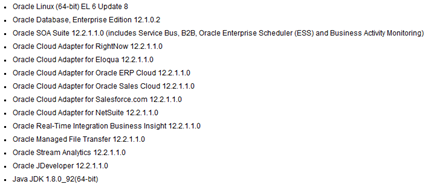
The following software is installed in this VirtualBox image:

Please check the Introduction and Readme document for detailed instructions on downloading and importing the VirtualBox image. Get the download here.

SOA & BPM Partner Community

For regular information on Oracle SOA Suite become a member in the SOA & BPM Partner Community for registration please visit www.oracle.com/goto/emea/soa (OPN account required) If you need support with your account please contact the Oracle Partner Business Center.

Blog Twitter LinkedIn image[7][2][2][2] Facebook clip_image002[8][4][2][2][2] Wiki