How to debug a BPM Process in BPM 12c by Fusion Applied


This video is an excerpt from one of our BPM Training courses that shows you how to use the new BPM process debugger in JDeveloper 12c
clip_image001
If you like our videos and blogs, be sure to subscribe to this channel. You can also sign up for Free Lessons and Training Discounts at https://training.fusionapplied.com. Watch the video here.

SOA & BPM Partner Community

For regular information on Oracle SOA Suite become a member in the SOA & BPM Partner Community for registration please visit www.oracle.com/goto/emea/soa (OPN account required) If you need support with your account please contact the Oracle Partner Business Center.

Blog Twitter LinkedIn image[7][2][2][2] Facebook clip_image002[8][4][2][2][2] Wiki

Top tweets SOA Partner Community – August 2016

image

August 2016 top tweets by soaCommunity

Send your tweets @soacommunity #soaCommunity and follow us at http://twitter.com/soacommunity. Make sure you share your content with the community!

SOA & BPM Partner Community

For regular information on Oracle SOA Suite become a member in the SOA & BPM Partner Community for registration please visit www.oracle.com/goto/emea/soa (OPN account required) If you need support with your account please contact the Oracle Partner Business Center.

Blog Twitter LinkedIn image[7][2][2][2] Facebook clip_image002[8][4][2][2][2] Wiki

Technorati Tags: twitter,SOA Community,Oracle SOA,Oracle BPM,OPN,Jürgen Kress

Talk to your UI from your BPM process by Fernando

clip_image002

A few weeks back we had the opportunity to participante in an 12c challenge which had lots of different flavours (BPM, Coherence, ADF, etc.) and some very strict performance requirements.

Scenario

In this solution, an operator would be logged on to an ADF application showing different regions, with one particular region that would update as the BPM instance progressed through the different human tasks in the process. The team had opted for a simple solution to find out when a BPM instance had reached a human task: to poll the engine until a task was found.

The problem

Polling the engine could be a solution if the instance load was low but the objective was to handle thousands of short-lived instances in parallel, which would overload the engine with queries. In addition, there was the issue of having to wait an interval which resulted in additional time loss.

As with most push/pull cases, the ideal would be to approach the problem from the other side of the fence: instead of polling for events, pushing them from the BPMN process and reacting to these from the UI side.

For the first part, emitting events when the BPM tasks arrives at a human task would be straight-forward: the Human Workflow API provides a series of callback events that can be used, with the onAssigned event being the one to use. Therefore, the remaining question was how to receive and process events on the ADF side.

The solution

From the requirements, we needed a way to react when an event was received. This immediately lead to using JavaScript, as it is well supported in ADF. The only question left was what type of event to receive.

The answer lies in a new Weblogic 12c "native" feature: web-sockets (we can use web-sockets in 11g using Jersey as well). JavaScript can handle opening new sockets and listening for messages.

We developed a Web Socket application that would enable a server endpoint for every BPM instance (remember these are short-lived instances, thus there is no risk of running out of resources).

As the ADF app was responsible for creating BPM instances with a correlation key, it connected to the server endpoint using that very same key, effectively establishing a direct connection to the endpoint with its own channel.

On the server side, every onAssigned event that would be received by the human task callback class would publish a new message to the endpoint (using the same correlation key, in this case exposed as a public attribute in the human task) which in turn would be relayed by the server to the ADF UI. Read the complete article here.

SOA & BPM Partner Community

For regular information on Oracle SOA Suite become a member in the SOA & BPM Partner Community for registration please visit www.oracle.com/goto/emea/soa (OPN account required) If you need support with your account please contact the Oracle Partner Business Center.

Blog Twitter LinkedIn image[7][2][2][2] Facebook clip_image002[8][4][2][2][2] Wiki

BPM and BPMN: A Concise Explanation by Mark Hearon

clip_image002

If you are reading this blog post, chances are you noticed the title and thought, “At last, a concise explanation of BPM and BPMN.  This is going to be great!”  It is not likely (however possible) that we may both be sorry by the end of our time together.  Consuming my reader’s digest explanation of BPM and BPMN may be as challenging as distilling the subject into short form!

Am I crazy?  Absolutely.  Are you crazy?  That all depends on whether you just answered that question aloud for others in the office to hear.  Regardless, fear not; this former public educator has your back.  Also, if you happen to be researching BPM and BPMN for the first time, consider this post a primer for further exploration.  To delve deeper, feel free to drop your questions and comments below.  I would be happy to reply.

What is BPM?

Business process mapping exists as a way of visually representing the processes of an enterprise for analysis.  Such analysis can reveal patterns of inefficiency that cost corporations a fortune in lost time and opportunity.  BPM is a codified method for improving business processes leading to greater efficacy and profit.

The bottom line: business process mapping pictorially delineates how work is accomplished in an organization. 

What is BPMN?

Business process modeling notation (which when complete can appear as anything from a benign diagram to a Tim Burton impression of Charlotte’s Web) is the pictographic language utilized to achieve the aforementioned BPM task.  Although a process map may delineate a highly-sophisticated business procedure, it can also be used to reflect simple processes.  This requires that BPMN be a flexible method of notating business processes.  The end result is a language that is relatively limited in scope and easy to apprehend.  The following may be considered the four (4) basic “words” of the BPMN language. Read the complete article here.

SOA & BPM Partner Community

For regular information on Oracle SOA Suite become a member in the SOA & BPM Partner Community for registration please visit www.oracle.com/goto/emea/soa (OPN account required) If you need support with your account please contact the Oracle Partner Business Center.

Blog Twitter LinkedIn image[7][2][2][2] Facebook clip_image002[8][4][2][2][2] Wiki

My private Corner – Bandit’s trip to Lisbon

image

We packed our bags and are ready for the PaaS Summer Camps 2016. A full week or learning PaaS solutions hands-on from the experts. Networking with partners around the world and enjoy Portugal. Make sure you get also prepared, pass the required assessments and check your demo.oracle.com account. Hold there is blue sky in Lisbon – the cloud is on holiday. Go to the beach and take a surf lesson at Angels Surf School! Good trip #jkwc

SOA & BPM Partner Community

For regular information on Oracle SOA Suite become a member in the SOA & BPM Partner Community for registration please visit www.oracle.com/goto/emea/soa (OPN account required) If you need support with your account please contact the Oracle Partner Business Center.

Blog Twitter LinkedIn image[7][2][2][2] Facebook clip_image002[8][4][2][2][2] Wiki

Technorati Tags: private corner,SOA Community,Oracle SOA,Oracle BPM,OPN,Jürgen Kress

Using Oracle Process Mobile Application by Waslley Souza

clip_image001


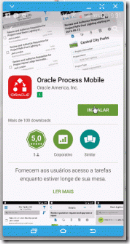
When you are using the Oracle Process Cloud Service, you can use the Oracle Process Mobile Application on your mobile device to start a new process or access the task list to approve or reject the tasks assigned to you.

In this post, we will start a new process through the Oracle Process Mobile Application, approve the task assigned to a user and see the history of the process in Oracle Process Cloud Service from a web browser on a desktop computer.

First of all, download and install the application on your mobile device.

Configure the application.
In the Host field, I used the URL for my Oracle Process Cloud Service Workspace. Read the complete article here.

To request a free OCS trial service please visit our SOA Partner Community Workspace here (SOA Community membership required)

SOA & BPM Partner Community

For regular information on Oracle SOA Suite become a member in the SOA & BPM Partner Community for registration please visit www.oracle.com/goto/emea/soa (OPN account required) If you need support with your account please contact the Oracle Partner Business Center.

Blog Twitter LinkedIn image[7][2][2][2] Facebook clip_image002[8][4][2][2][2] Wiki

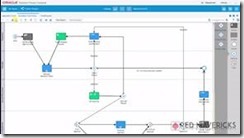
Video – How to build a Process Cloud Service Application (Business Travel Requests) in 40 minutes – Part III – Business Rules Setup by Jose Rodrigues

clip_image002

Welcome to Red Maverick’s fifth video, the third of the Business Travel Request Management Series.

In this series we’ll guide you on how to build a complete, working BPM application using  Oracle’s Process Cloud Service.

For this part, the focus is on setting Business Rules using Oracle’s PCS, to fine tune the process flow path, depending on process data.

This scenario and video was first prepared by me for Link Consulting‘s Process Cloud event, that was held in July 2015. Watch the video here.

SOA & BPM Partner Community

For regular information on Oracle SOA Suite become a member in the SOA & BPM Partner Community for registration please visit www.oracle.com/goto/emea/soa (OPN account required) If you need support with your account please contact the Oracle Partner Business Center.

Blog Twitter LinkedIn image[7][2][2][2] Facebook clip_image002[8][4][2][2][2] Wiki

Basic integration of Process Cloud Service with Document Cloud Service by Lykle Thijssen

clip_image001


Recently, Oracle had released a new version of Process Cloud Service. It mainly contains some minor improvements, but also has one major update: Oracle Process Cloud Service can now use Oracle Document Cloud Service for working with documents in business processes. This blog will show you how to make it happen.

Establishing the connection

In the main page of Oracle Process Cloud Service, click on your user in the right-top corner and select “Administration”. On the Administration page, you click “Settings” under Configuration, which will get you where you want to be. Here you can fill in the URL of your Document Cloud Service, as well as username and password of the admin user. You can test the configuration immediately and click “Save” in the upper right corner when the integration was successful.

Once the connection has been established, we can proceed to using documents in our processes immediately!

Developing the process

For this blog, I have created a small sample process for insurance claims. An employee of an insurance company will enter some details through a web form and attach a bill sent by a client. Then, if the bill is over $1000, a manager needs to approve or reject the claim. After this, the process will end. The small sample process looks as follows:

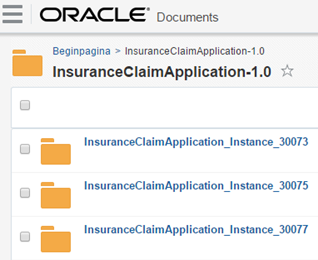
During development of the process, I have done nothing related to documents, this comes automatically! Of course, it is possible to work on document settings: for example, you can set access rights while implementing the human task. You can also create document folders on the application level of Process Cloud, but for now, I have decided to go with the default setting of one folder for my application, which will automatically be created in Document Cloud. For every instance of the process, a subfolder is automatically created too, so from Document Cloud side, it looks as follows: Read the complete article here.

SOA & BPM Partner Community

For regular information on Oracle SOA Suite become a member in the SOA & BPM Partner Community for registration please visit www.oracle.com/goto/emea/soa (OPN account required) If you need support with your account please contact the Oracle Partner Business Center.

Blog Twitter LinkedIn image[7][2][2][2] Facebook clip_image002[8][4][2][2][2] Wiki

Importance of Transparency in Government by Kellsey Ruppel

clip_image002

Open government is not a new concept – its modern roots can be traced back to efforts by democratic societies to bring openness to government dealings. In the United States, Freedom of Information Act (FOIA) dates back to the mid 1960’s. Today, most national governments, states, provinces, municipalities and other government jurisdictions have committed to increased transparency. Most recognize that a transparent government is an essential element of a free and democratic society. The White House issued a Memorandum titled “Transparency and Open Government” that states “Openness will strengthen our democracy and promote efficiency and effectiveness in Government.” The memorandum lists three key principles:

  1. Government should be transparent.
  2. Government should be participatory.
  3. Government should be collaborative.

Open Government policies are already helping to contribute to the awareness off citizens and public entities, the success of partnering organizations (such as sub-agencies and authorities) and innovation of new government services. With open data and service policies in place, we are faced with the fundamental requirement to apply those policies to our daily operations as easily and cost-effective as possible.

How is information shared and accessed in State and Local government?

The Sunlight Foundation is a national, nonpartisan, nonprofit organization that uses the tools of civic tech, open data, policy analysis, and journalism to make our government and politics more complete, equitable and effective democratic participation. Let’s use this foundation’s guiding best-practices as a model to lay out how information is being made available for sharing and re-use.

  • Sharing qualitative data in the form of objective reporting
  • Building informative and intuitive websites and mobile apps
  • Providing access to APIs that power existing applications to be re-used by others

In order to deliver these Open Government services, there are intrinsic technology needs to:

  • Secure document collaboration and distribution
  • Rapidly develop mobile friendly user experiences
  • Manage and measure the performance of access to disparate systems
  • Automate self-service requests to data and services

Implementing cloud-based solutions can not only make government more efficient and cost-effective, but also improve the accessibility to information and data.

Oracle and Open Government

Oracle offers a wide variety of Cloud technology and application products that can support government transparency efforts in these key areas:

  1. Technology infrastructure
  2. Information access and presentation
  3. Service performance
  4. Budget/financial Information
  5. Access to Public Documents
  6. Read the complete article here.

SOA & BPM Partner Community

For regular information on Oracle SOA Suite become a member in the SOA & BPM Partner Community for registration please visit www.oracle.com/goto/emea/soa (OPN account required) If you need support with your account please contact the Oracle Partner Business Center.

Blog Twitter LinkedIn image[7][2][2][2] Facebook clip_image002[8][4][2][2][2] Wiki

ServiceCloud Rightnow Integration, XSLT Transformations! By Fabio Persico

clip_image002


I’ve just roll out to a live environment, a SOA Integration project with Oracle Service Cloud Rightnow.

The customer needed to migrate from a in-house CRM to Oracle Service Cloud and with my company Infomentum we have helped them in taking this big step. Since that I have made lots of experience with OSC WebServices.

Here I just want to share the complex XSLT Transformation which we have implemented to communicate with the OSC WebServices, hopefully these can speed up any other SC integration projects.

There are 6 transformation in the ZIP package (we have implemented more):

XSLT Name

SC Object

Out of the box Object?

Operation Type

xsltContact2Update

CONTACT

Yes

UPDATE

xsltOrganisationToUpdate

ORGANIZATION

Yes

UPDATE

xsltProgrammeToUpdate

CO.PROGRAMME

No

UPDATE

xsltProgrammeTypeToUpdate

CO.PROGRAMMETYPE

No

UPDATE

xsltCourseToUpdate2

CO.COURSE

No

UPDATE

xsltSessionToUpdate

CO.SESSION

No

UPDATE

In the XSLTs you’ll find all the details about the TARGET columns (Oracle Service Cloud ones). Here are some important concepts I want to highlight:

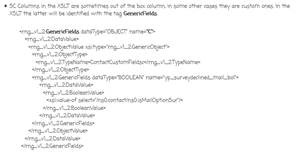
  • SC Columns in the XSLT are sometimes out of the box column, in some other cases they are custom ones. In the XSLT the latter will be identified with the tag GenericFields. Read the complete article here.

SOA & BPM Partner Community

For regular information on Oracle SOA Suite become a member in the SOA & BPM Partner Community for registration please visit www.oracle.com/goto/emea/soa (OPN account required) If you need support with your account please contact the Oracle Partner Business Center.

Blog Twitter LinkedIn image[7][2][2][2] Facebook clip_image002[8][4][2][2][2] Wiki